Scripts
Description
To make test case useful, there are some scripts that allow you to configure the test case and define your tests. In the following scripts, we offer you predefined functions which can help you extend your own JAva code. In the import declaration, further classes can be imported and used in the script.
Before Test Execution
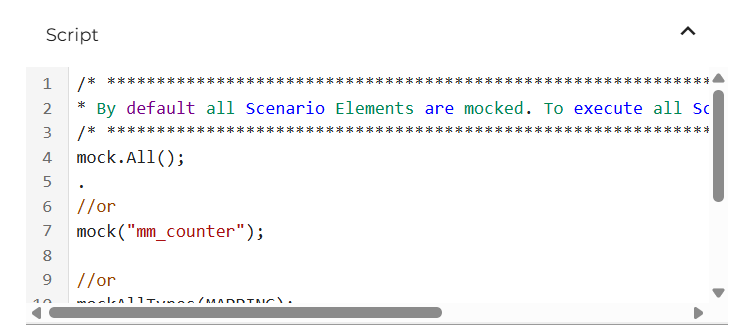
In the "Before Test Execution", you can use predefined methods, which allow you to define mocks. Mocks are scenario elements that should not or cannot be called when executing a test. These are simply replayed by the recording. When a test case is created, all scenario elements are automatically mocked.
| Method | Description |
|---|---|
mock(String scenarioElementName) | Scenario Element that needs to be mocked |
mockAll() | This method marks all recorded Scenario Elements as mocks except the Scenario Element to be tested |
mockAllTypes(String scenarioElementType) | Mocks all Scenario Elements of the given Type (e.g. MessageMapping, Adapter). Orchestra Intellicense offers all supported types. Just press CTRL + SPACE and you can see all available Types that you can use. |
After calling one of the mock all methods, the following methods can be performed.
| Method | Description |
|---|---|
except(String scenarioElementName) | Removes the Scenario Element from the mocks. |
exceptType(String scenarioElementType) | Removes all Scenario Elements of the given Type from the mocks. |
Test Execution
The "Test Execution" defines what is to be tested. Here, you can check whether a scenario element behaves as expected or not.
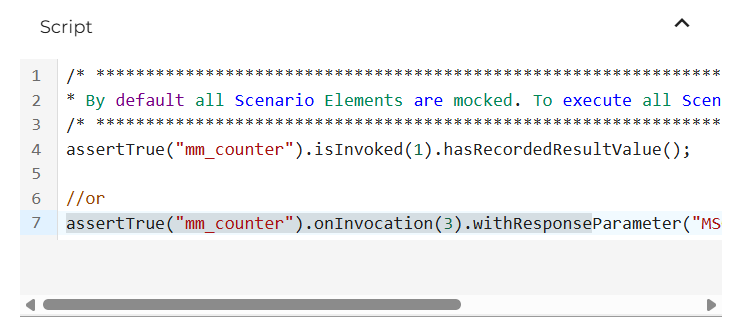
The test execution functions are designed as a Fluent API. This means that you can access the following entry methods and call them one after the other and thus perform multiple tests on a given scenario element.
First you have to define which scenario element should be checked. You can do this using the following functions.
| Method | Description |
|---|---|
assertTrue(String scenarioElementName) | This method determines if the assertions associated with the Scenario Element must be true. |
assertThat(String scenarioElementName) | This method specifies the Scenario Element to be asserted (similar to assertTrue()). |
assertFalse(String scenarioElementName) | This method determines if the assertions associated with the Scenario Element must be false. |
failTestCase() | This method fails a Test case, and it is also set as the default for newly generated Test cases. |
failTestCase(String message) | This method fails a Test case with a given error message. |
After defining a scenario element to be checked, the following checks can be performed on it.
| Method | Description |
|---|---|
isInvoked(int times) | This method checks whether a Scenario Element was invoked x times. |
withResponseParameter(String parameter) | This method first checks if the given parameter exists in the recorded objects, and if it does, it filters the objects by that parameter. |
hasRecordedResultStructure() | This method checks if a Scenario Element has the same Result quantity and Parameter Names as the recorded one. |
hasRecordedResultValue() | This method checks if the parameter quantity, names, and values are identical. |
hasThrowAnError() | This method checks if a Scenario Element has thrown any error. |
hasThrowAnError(String expectedErrorMessage) | This method checks if a Scenario Element has thrown the error containing the given error message. |
onInvocation(int times) | This method checks if a Scenario Element was invoked x times and filters the Result Objects. |
getRecordedResultValueBuilder() | This method makes the recorded result value builder available to the customer, also used internally by other simplified functions. Returns a new Builder-Object that offers further methods. |
hasRecordedResultValueExceptField(String[] fields) | This method calls the Builder-Object, excludes the passed fields, and calls the validate method of the builder. |
hasRecordedResultValueExceptSegemt(String[] segments) | This method calls the Builder-Object, excludes the passed segments, and calls the validate method of the builder. |
hasRecordedResultValueIncludeField(String[] fields) | This method calls the Builder-Object, includes the passed fields, and calls the validate method of the builder. |
hasRecordedResultValueIncludeSegment(String[] segments) | This method calls the Builder-Object, includes the passed segments, and calls the validate method of the builder. |
filterResultMessage(String field) | This method filters the actual Message with the XPath or JsonPath. Returns a new extended Builder-Object that offers further methods. |
hasRecordedResultMessageStructure() | This method checks if the current message has the same structure as the recorded message. The values of the message will be ignored. |
After calling the recorded result value builder, the following methods can be called.
| Method | Description |
|---|---|
excludesField(String field) | Excludes a single Field of the XPath/JsonPath from validation. Other fields are not affected and will be validated. |
includeField(String field) | Includes a single Field of the XPath/JsonPath to validation. Other fields will not be validated. |
excludeSegment(String segment) | Excludes a Segment of the XPath/JsonPath. This node and its child elements will be excluded and will not be validated. |
includeSegment(String segment) | Includes a Segment of the XPath/JsonPath. This node and its child elements will be included and the other nodes will not be validated. |
validate() | This method executes the validation of the result message with the defined includes and excludes. |
After filtering the result message, the following methods can be called.
| Method | Description |
|---|---|
contains(String value) | Checks if the filtered field contains the passed value. |
notContains(String value) | Checks if the filtered field does not contain the passed value. |
matches(String regex) | Checks if the filtered field matches the passed regular expression. |
After Test Execution
In the "After Test Execution", currently no predefined functions are offered. Nevertheless, Java code can be defined here, which is to be expected after a test.