Message Queue Listener
Description
With this channel, it is possible to receive messages out of a message queuing system. The access must occur via Java Message Service (JMS).
Creation
To create a Message Queue Listener follow the steps described in the general description of Adapters.
Configuration
The dialog to configure the Message queue Listener looks like:
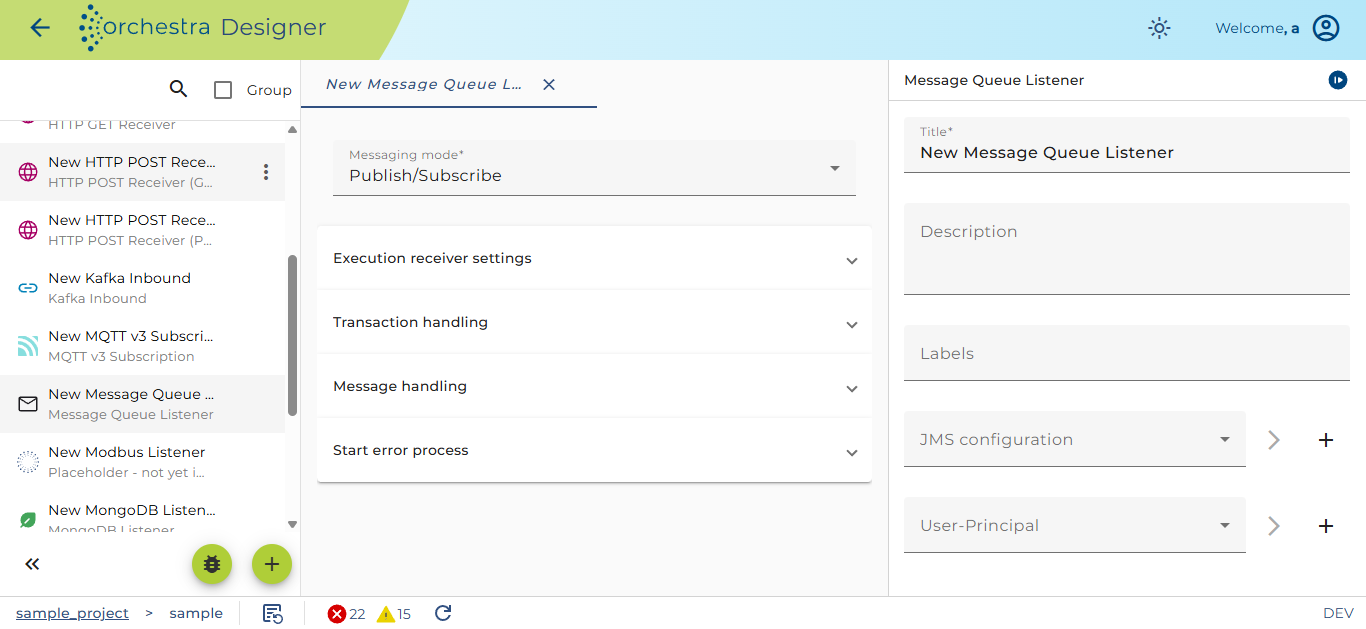
Detail settings for the Message Queue Listener
JMS-Configuration: Choose an environment entry to set up the JMS configuration
User principal: Choose a user if an authentication is needed. This user must be set up before, how this is made can be found here.
Connection settings
Messaging mode:
-
Publish/Subscribe: Registration at publisher;
-
Point to point: only one receiver
Execution _Receiver settings
Execution: Defines whether to wait for the processing by Orchestra (synchronous execution), or whether to receive the data without waiting for the processing (asynchronous)
Processing timeout: in the case of synchronous execution, this parameter defines for how long to wait for the processing before the next message is received.
idle Time: Duration without a message after which the connection will be re-established. An idle time of zero means infinite duration.
Transaction Handling
Type: type of transaction handling
-
Recommended value: Use local transaction
-
Error delay: specifies the delay period of error messages
Message handling
Message selector: Option to filter by messages whose header and property values match the selector. The search string syntax is based on a subset of the SQL92 syntax. The syntax mimics the SQL WHERE clause syntax.
Example: title LIKE 'Thrill%' (to search for a title that starts with Thrill)
Deserializer: type of deserializer
Deserializer Here the user may select and configure a Deserializer used to parse the message and create a message from its content. Along with this one or more Stream filters may be added and configured.
There are two parsing modes: parse on creation (the default) and parse on demand.
-
parse on creation - the data are parsed by the selected deserializers while reading the byte stream. If in this process an error occurs, it is visible only in the log file because no process instance exists yet.
-
parse on demand - the byte stream is read binary without interpreting it; together with the data the configuration of the selected deserializer is stored. If the message is accessed, e.g. by a mapping, it is parsed using the attached deserializer configuration. If the deserializer throws an error it can be handled by from the process instance.
Start error process:
If the channel encounters an error you can connect it in the process model with an error start event to create a process instance handling that error.
If the user sets the checkbox Always then every time an error occurs an according process instance will be created. If that error occurs regularly because of a short polling period the user may want to avoid creating a lot amount of process instances. In this case you must not set Always but enter a period of time. If after an error further errors occur within that period no further error process will be created.
JMS message types
Depending on the linked JMS message type different input messages are generated.
| Parameter | Description |
|---|---|
| TextMessage | Depending on the deserializer used a Orchestra Message from the incoming JMS message is generated. |
| BytesMessage | Depending on the deserializer used a Orchestra Message from the incoming JMS message is generated. |
| StreamMessage | From the incoming JMS message an Orchestra Message is generated. The incoming stream is contained in a field <value>. |
| MapMessage | Generates an Orchestra message containing all the key value pairs of the incoming JMS message <messagexyz> <propertyname1>value1</propertyname1> <propertyname2>value2</propertyname2> </messagexyz> |
| ObjectMessage | The incoming JMS message generates an Orchestra message without any content. Additionally, an input object of type "any" is generated which contains the incoming object (must be cast to use it). |
Throttling
This channel is supported by throttling limit feature that described in chapter Throttling.
See also
To set up a user, go to Credentials.