SAP RFC Caller
Description
A SAP RFC Caller is an outbound adapter which will act as an RFC adapter for outgoing SAP calls. This adapter is used to submit Remote-FunctionShape-Calls (RFCs) to a SAP/R3 system.
Please note that this adapter uses the SAPJCO libraries from SAP. Since we can not assume that these libraries exist in every system, the SAP adapter is switched off by default.
If you want to use this adapter, the configuration parameter sap.jco.enabled in the configuration group adapter must be switched on, see How to enable SAP adapters.
Creation
To create a SAP RFC Caller adapter follow the steps described in the general description of Adapters.
Configuration
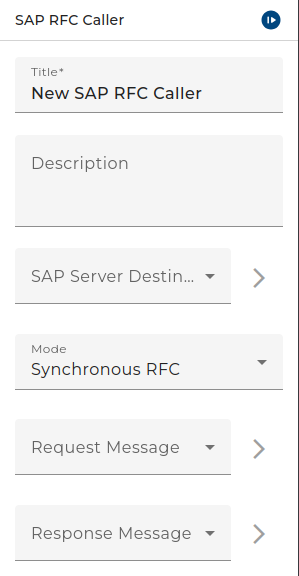
The dialog to configure the SAP RFC Caller looks like:
 |
|---|
| Base view of the adapter SAP RFC Caller |
(add image)
Step by Step
-
SAP-Client - This value represents the environment entry for the SAP Client configuration. For more information on how to configure SAP client please refer to SAP client connection reference manual.
-
Mode - Represents the mode of the sap calls. Four different options are provided for this configuration field.
-
Synchronous rfc - A sRFC performs a function call directly and waits for the response from the called function module.
-
transactional rfc - Asynchronous communication method that executes the called function module exactly once (service property: Exactly Once)
-
Queued rfc - A qRFC performs the function calls specified by a processing sequence / queue.
-
BAPI Call - A BAPI are standard SAP function modules provided by SAP for remote access. This option will ensure the automatic execution of BAPI_COMMIT_WORK api call against SAP server.
-
BAPI Call (User defined session handling) - In SAP environments it is sometimes necessary to execute more than one BAPI in a transaction. When this mode is used, exactly this is possible. When the first BAPI within this mode is executed, Orchestra automatically starts a transaction which is attached to the current process token. All consecutive BAPI's that are executed in the same process token are automatically attached to this transaction. A transaction is automatically ends when the user submits a BAPI_TRANSACTION_ROLLBACK or BAPI_TRANSACTION_COMMIT. When the user doesn't call BAPI_TRANSACTION_ROLLBACK or BAPI_TRANSACTION_COMMIT it is done automatically on the end of the associated process. When the process ends successful a commit is executed, otherwise a rollback will be done.
noteBAPIs can be called within the R/3 System from external application systems and other programs. BAPIs are the communication standard for business applications.**
- Queue - This field is related with the mode selection. When a Queued rfc mode is selected this field will become enabled. Here you can select queue value for Queued frc calls.
- Request message - Data Type which defines the type of the Request message.
- Response message - Data Type which defines the type of the Response message.
-
If the parameter request and response message are left on „Dynamically“, the adapter will detect with the help of the transferred message which function module should be called.
Otherwise, only such calls with the defined message type will be sent.
Testing the adapter
You may test the SAP RFC Caller like every other outbound adapter.
When the adapter is configured the user can test its functionality by clicking on the test symbol in the toolbar of the Designer.
Then a dialog opens showing the events the adapter receives or an error message.