OPC UA V2 Dynamic Subscription
Description
The OPC UA Dynamic Subscription Adapter is an Inbound Channel used to monitor data changes on an OPC UA Server (Environment Entry). For this purpose, each OPC UA Dynamic Subscription Channel creates its own Subscription, which holds a list of monitored items. If one or more of these monitored items change their value, the OPC UA Dynamic Subscription Channel will be triggered by the OPC UA Server and starts a Process Model.
The monitored items are Nodes from the Server Address Space of an OPC UA Server. The nodes that are monitored can be added dynamically to the list of monitored items. Therefore, the user has to create a process model that uses the script API of the channel to modify the set of configured items.
Currently, this channel can be used for Object Nodes and Variable Nodes only.
Configuration
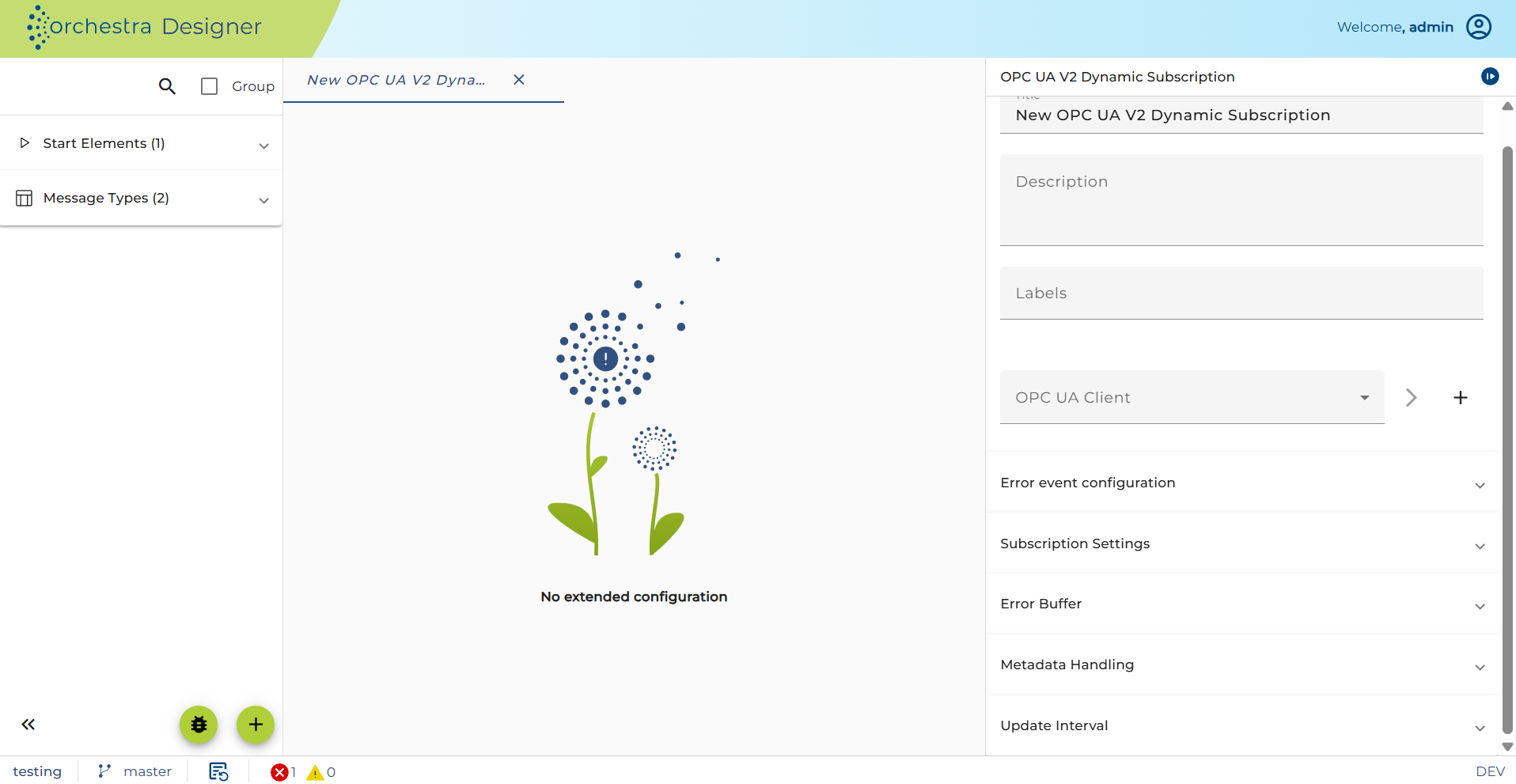
OPC UA Client
Defines a connection to an OPC UA Server
Error Event Configuration
Defines how the channel handles errors during the handover of monitored item data to Orchestra.
-
Error Hold Time
Specifies how long the channel should wait before retrying or triggering the error process.If left blank, a default of
0sis used.
Subscription Settings
Publishing Interval
The publishing interval defines the interval in which the server publishes all monitored node changes.
The publishing interval and the sampling interval work together. If you want the changed node values at a high frequency, use a faster sampling interval rather than a faster publishing interval. So you will get a bundle of changed values every publishing interval. This is more effective than publishing every single value on its own.
For example: If you set the sampling interval to 1 second and the publishing interval to 1 second, you will get every second 1 value of each monitored node — but only the nodes whose values have changed since the last sampling interval. If you set the sampling interval to 0.5 seconds and the publishing interval to 1 second, you will get every second 2 values of each monitored node — but only the nodes whose values have changed since the last sampling interval.
The OPC UA Servers have a minimal and maximal publishing interval configured. So if the requested publishing interval value is below or above the configured limits, the Server will correct the value to its minimal or maximal publishing interval.
A publishing interval of one second is a good default value.
Sampling Interval
The sampling interval defines the interval in which the server checks each monitored node if its value has changed.
The publishing interval and the sampling interval work together. If you want the changed node values at a high frequency, use a faster sampling interval rather than a faster publishing interval. So you will get a bundle of changed values every publishing interval. This is more effective than publishing every single value on its own.
For example: If you set the sampling interval to 1 second and the publishing interval to 1 second, you will get every second 1 value of each monitored node — but only the nodes whose values have changed since the last sampling interval. If you set the sampling interval to 0.5 seconds and the publishing interval to 1 second, you will get every second 2 values of each monitored node — but only the nodes whose values have changed since the last sampling interval.
The OPC UA Servers have a minimal and maximal sampling interval configured. So if the set sampling interval value is below or above the configured limits, the Server will correct the value to its minimal or maximal sampling interval.
A sampling interval of one second is a good default value.
The 'Publishing Interval' and the 'Sampling Interval' work together. If you want the values of the changed monitored items at a high frequency, use a faster 'Sampling Interval' rather than a faster 'Publishing Interval'. So you will get a bundle of changed values every Publishing Interval. This is more effective than publishing every single value on its own.
For example:
If you set the 'Sampling Interval' to 1 second and the 'Publishing Interval' to 1 second, you will get every second one value of each 'Monitored Item'.
But only the monitored items whose values have changed since the last 'Sampling Interval'.
If you set the 'Sampling Interval' to 0.5 seconds and the 'Publishing Interval' to 1 second, you will get every second two values of each 'Monitored Item'.
But only the nodes whose values have changed since the last sampling interval.
Value Queue Size
The requested size of the MonitoredItem queue. If more items are sampled within a publishing interval, the server uses the queue to store all changes until they are published to the registered subscription.
Please choose a proper value for the queue size so that at least (publishing interval / sampling interval) items can be stored. If you reserve a lower queue size, the oldest values will be discarded.
Special Queue Size Values
-
Queue size = 1
The queue has a single entry, effectively disabling queuing. -
Queue size > 1
A first-in-first-out (FIFO) queue is used. If the queue size is too small, older values will be discarded. -
Queue size = Maximum
The maximum size that the server can support is up to 4,294,967,295.Depending on the server settings, this value may be revised by the server and set to a smaller value.
-
Queue size = 0
If0is passed by the client, the server shall set the queue size to1.
Filter Mode
Defines how the subscription channel should deal with duplicates. A duplicate occurs when the same value of a monitored item is received twice from the OPC UA server. The duplicate check is done by comparing the value of the item, the source timestamp, and the state for the monitored item. If one of the attributes differs, the item is reported to Orchestra; otherwise, if filtering is active, it will be discarded.
The following filter modes are supported:
-
Filtering is disabled: The filtering is completely disabled. Even if duplicates occur, they will not be filtered.
-
Filtering of duplicates (Scenario start/stop, Channel start/stop): The channel will automatically filter all duplicates received during the operations. Furthermore, the duplicate filtering preserves the filter information over scenario and channel start/stop. This means that values are filtered even when the channel is deactivated between receptions of an item.
-
Filtering of duplicates (Scenario start/stop, Channel start/stop, Deployment): The channel will automatically filter all duplicates received during the operations. Furthermore, the duplicate filtering preserves the filter information over scenario and channel start/stop and re-deployment. This means that values are filtered even when the channel is deactivated between receptions of an item.
Data Change Filter
Defines the condition under which a monitored item reports data changes to the OPC UA Subscription.
The OPC UA standard allows filtering data change notifications based on value. The following options are typically supported:
-
Notify only when value has changed
A notification is triggered only if the value of the monitored variable has actually changed (i.e., the new value is different from the previous one). -
Notify if value is updated
A notification is triggered even if the value remains the same, but the variable is updated, even if it was simply re-written with the same value.
Error Buffer
Defines how Orchestra should behave if it is not capable of taking over the received data.
-
No buffering in case of error
If the size of the error buffer is set to a negative value, error handling is disabled.
Only the currently received values are handed over to Orchestra.
Values that encounter an error during handover are discarded. -
Default
If no value is set, the built-in default value of 5000 is used. -
User-defined
If an error occurs, a positive value defines the number of OPC UA items that should be preserved and handed over during the next run.
The maximum allowed buffer size is 4,294,967,295.warningThis is technically possible but not recommended, as it could lead to out of memory errors.
Metadata Handling
Defines how the channel deals by default with metadata of the monitored items.
The best performance is achieved when only the value of the monitored items is passed to Orchestra, since no additional lookups to the OPC UA Server are necessary.
Update Interval
Sets the interval for retrying to add previously failed monitored items to the subscription.
-
Trigger type
Restricts when the timer is allowed to run:- Daily – Only on selected weekdays.
- Monthly – On a specific day of the month.
-
Timer Mode
- Absolute Timer – Fires once at a fixed time (e.g., every day at 06:00).
- Periodic Timer – Repeats within a time range based on:
- Start/End time – Time window for the timer to be active.
- Repeat count – Number of times to fire. Leave blank or check "Run indefinitely" to allow unlimited runs.
- Repeat interval – Time between events (e.g., every 10 minutes).
-
Run relative to the start time
If enabled, intervals are calculated from the actual start time rather than a fixed clock time.
Message Type
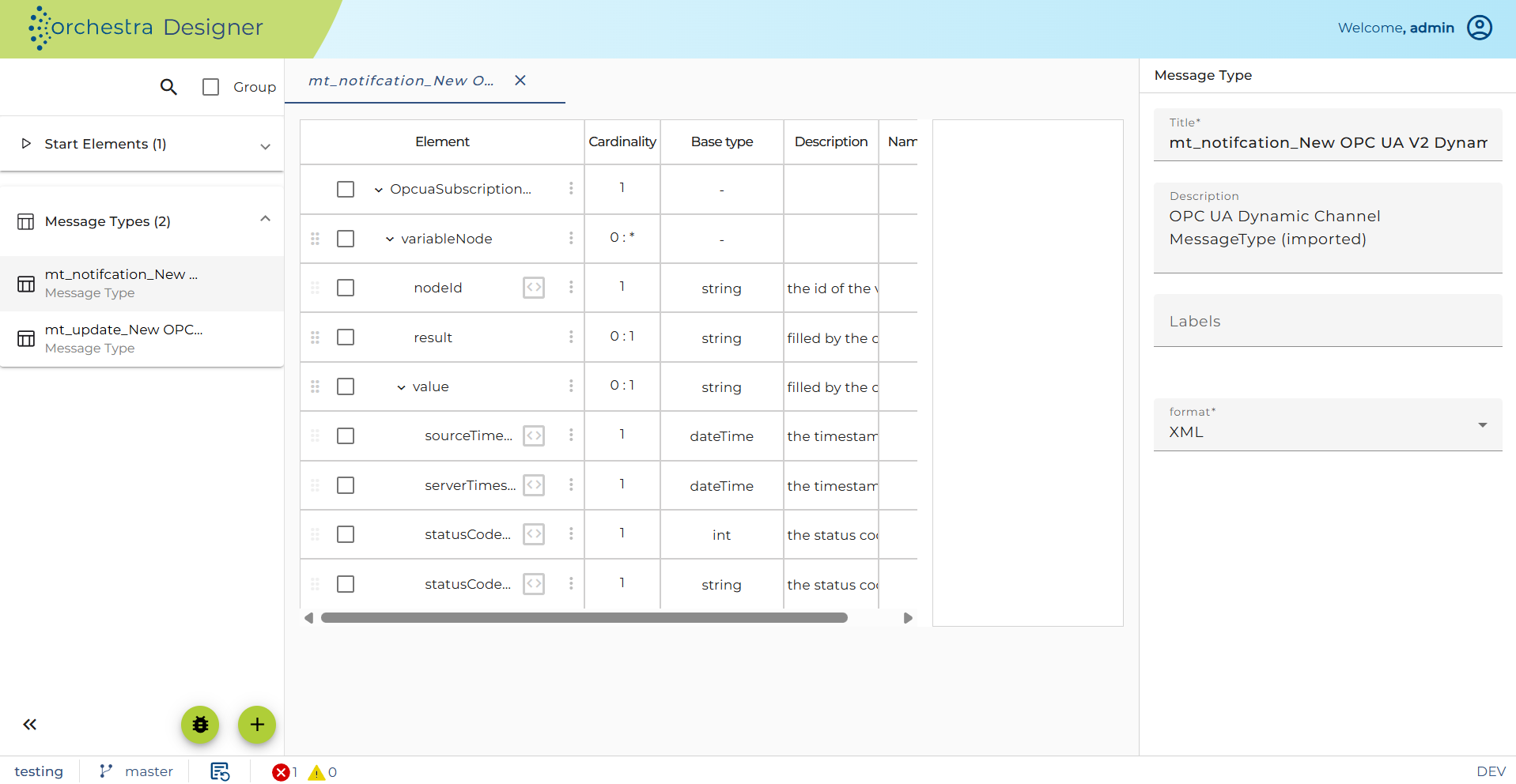
When the subscription channel signals a set of monitored items to Orchestra, the following message type is used:
Registering monitored items
Monitored items can be managed manually on the basis of the following Java API:
/**
 * A high-level API for managing subscriptions of dynamic Orchestra subscription channel
 */
public interface SubscriptionContext {

  /**
   * Add a set of nodes to the list of monitored items
   */
  public void addNodes(Set<String> nodeIdentifiers);

  /**
   * Add a single node to the list of monitored items
   */
  public void addNode(String nodeIdentifier);

  /**
   * Remove a set of nodes from the list of monitored items
   */
  public void removeNodes(Set<String> nodeIdentifiers);

  /**
   * Remove a single node from the list of monitored items
   */
  public void removeNode(String nodeIdentifier);

  /**
   * Remove all monitored items from the subscription
   */
  public void removeAllMonitoredItems();

  /**
   * With this method one can hand over an Orchestra message to update a subscription
   * @param subscriptionUpdateMessage the message that contains the node ids that should be added/removed from the subscription
   */
  public void updateSubscription(Message subscriptionUpdateMessage) throws EpiBaseException;
}
A subscription context can be obtained by using the following factory:
/**
 * This factory class is used to grant a loosely coupled access to OPC UA subscription context
 */
public class SubscriptionFactory {

  /**
   * With this method one can get access to a subscription context that is maintained by an underlying Orchestra
   * subscription context
   *
   * @param scenarioId the unique identifier of the owning scenario
   * @param scenarioElementName the name of the owning subscription channel
   * @return the subscription context that can be used to change the node subscription settings
   * @throws EpiBaseException
   */
  public static SubscriptionContext getSubscriptionContext(String scenarioId, String scenarioElementName) throws EpiBaseException {
    return getSubscriptionContext(scenarioId, scenarioElementName, 10);
  }

  /**
   * With this method one can get access to a subscription context that is maintained by an underlying Orchestra
   * subscription context
   *
   * @param scenarioId the unique identifier of the owning scenario
   * @param scenarioElementName the name of the owning subscription channel
   * @param waitTime a wait time in seconds. The function tries to obtain a reference to the subscription channel until this time expires.
   * @return the subscription context that can be used to change the node subscription settings
   * @throws EpiBaseException
   */
  public static SubscriptionContext getSubscriptionContext(String scenarioId, String scenarioElementName, int waitTime) throws EpiBaseException {

    // Obtain the subscription context.

  }
}
The following source code fragment shows how a set of monitored items can be added to a subscription:
/*
 * Register a set of monitored items at the subscription.
 * In this example the nodes are added individually by the node id
 */
SubscriptionContext subscriptionContext = SubscriptionFactory.getSubscriptionContext(getScenarioIdentifier(), "OpcuaSubscriptionChannel");

for (int i = 0; i < 4; i++) {
  subscriptionContext.addNode("ns=2;s=Objects/Data/produktionsMaschine" + i + "/ProduktionsAuftrag");
  subscriptionContext.addNode("ns=2;s=Objects/Data/produktionsMaschine" + i + "/Stueckzahl");
}
Please use the following imports when working with the subscription context:
import de.soffico.opcua.client.api.SubscriptionFactory;
import de.soffico.opcua.client.api.SubscriptionContext;
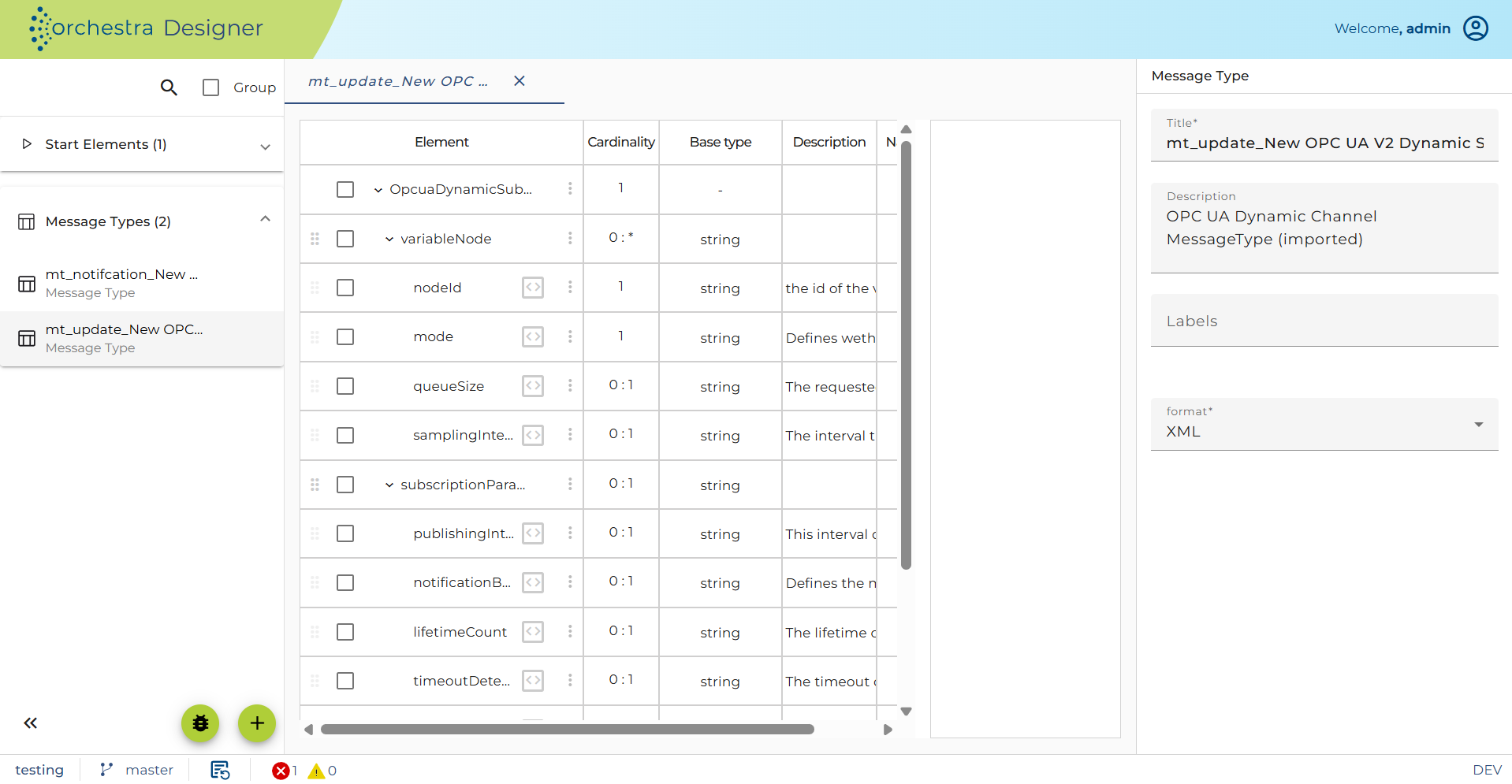
If you want to use the updateSubscription(Message subscriptionUpdateMessage) method, you have to pass an Orchestra message that contains the monitored items that need to be registered or deleted. The corresponding message type will be created automatically when the channel is created. An example is shown in the following diagram: