XJava mapping
An XJava mapping is a procedural mapping. The mapping is described by a procedure (a method) written in an extended Java language. The language is extended by allowing to embed XPath expressions into the source code. Orchestra uses a preprocessor to create plain Java code from this Extended java code. That means that in the Extended Java mapping you may use any Java statement or Java expression because it actually is Java.
Note that currently only Java 1.4 is supported because internally a Java 1.4 compiler is used (Janino). That means that especially generics are not available!
You also should know that the mapping script is nothing more than the body of a method. For each mapping a Java class is generated which inherits from the base class ProceduralMapping.
Creation
-
To create a XJava mapping, click on the plus icon located on the bottom left of the screen and click on Mapping.
-
Click on Script Mapping
-
Select XJAVA from the Script Type drop down and click 'Create'.
-
Select a name and an optional description for the mapping.
Configuration
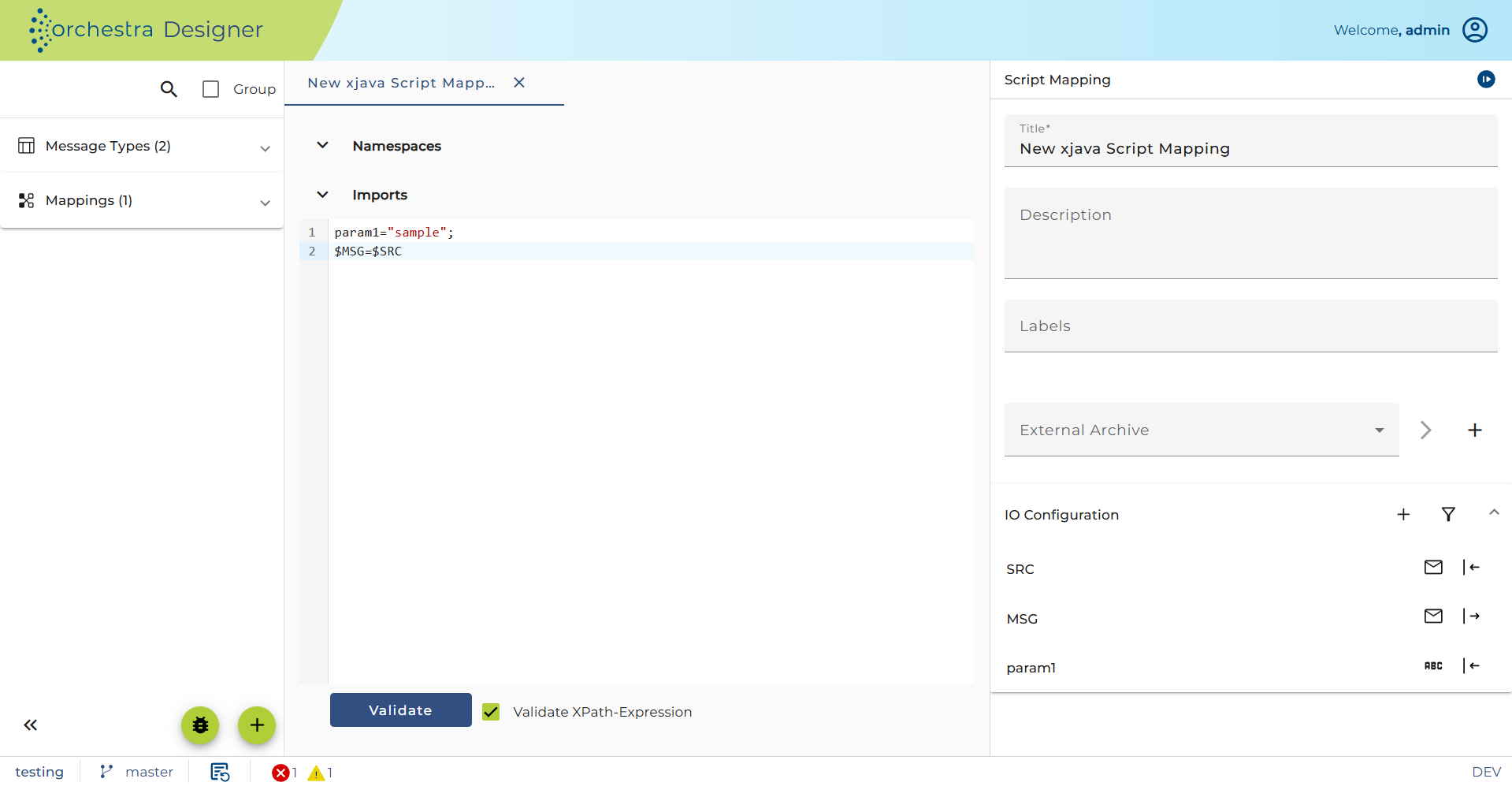
Using XPath assignments
Actually the Expression $SRC is the shortest possible XPath expression. Within the language of the Extended Java mapping an XPath always has to begin with a $ sign, which marks a variable name. So in the Extended Java mapping an XPath expression like concat($var, '.txt') is not possible because it is simply not recognized by the preprocessor. But this is not a serious problem because within java we have many more functions (static methods) available than in the XPath itself. So the Expression $SRC in the mapping script refers to the root node of the structured message references by the variable SRC. Respectively, the Expression $MSG refers to the root node of the target message to be created. This root node is created by the Extended Java mapping before the mapping script is executed.
Any assignment of the form $varname = <nodeexpr> performs a deep copy of the structured node on the right to the structured node on the left.
That means:
-
the Variable
varnamemust be defined in the top part of the mapping editor labeled Parameters. Otherwise, the XPath engine is not able to resolve the variable name. -
the Variable
varnamemust have the type message or Node. Node actually is the java interfaceorg.w3c.dom.Node -
the Variable
varnamemust already have a value. If you want to assign a Node to a variable simply make a Java assignment likeNode node = <nodeexpr>; -
The right side of the assignment must be an expression of type message, Node or NodeSet.
-
If the right side returns a message then the root node is selected. If it returns a NodeSet, then the first Node of that Node set is selected when evaluating the expression. If the Node set is empty, an exception is thrown.
-
Then a deep copy of the node computed from the evaluation of the right side expression is created and assigned to the node on the left. If the variable on the left references a Node which is part of a DOM tree the copy of the node is imported in that DOM tree.
Example: The assignment
`$dstRecord/tns:customer = $SRC/Projekt[projektnr=$projectnr]/Kunde;`
will be translated to by the preprocessor to the java code
```java
private XPath _XPATH10;
private XPath _XPATH11;
this._XPATH10 = new BaseXPath("tns:customer");
this._XPATH11 = new BaseXPath("Projekt[projektnr=$projectnr]/Kunde");
assign(selectL(dstRecord,_XPATH10), selectR(SRC,_XPATH11));
```
The method selectR will then apply the XPath on the source tree, selectL will select the target XPath on the target tree and create some missing nodes. Finally, the method assign will then copy the content of the source node to the target node.
Any assignment of the form $varname = <simpleexpr> also performs a copy of the value on the right to the structured node on the left.
That means:
-
the Variable
varnamemust be defined in the top part of the mapping editor labeled Parameters. -
the Variable varname must have the type message or Node.
-
the expression on the right must be of type string, double or date.
-
the right side expression is converted to a string and then set as text value of the node on the left.
You can use XPath expressions to reference elements in the source message as well as to reference elements of the target structure if you want to assign values to it. Nodes missing in the target will be created automatically.
E.g. if you write the statement
`$MSG/first/second/third = "hello";`
then the missing nodes first, second and third will be created. The node third then receives the text value hello.
Validating XPath expressions
The script editor provides support for validating both the overall script and individual XPath expressions.
A Validate button is available to perform a general check of the mapping script. To additionally validate XPath expressions used within the script, you can enable the checkbox Validate XPath expressions located next to the button.
When the checkbox is selected, XPath expressions are validated using a dedicated endpoint when you click Validate. This helps ensure that the XPath expressions used in your script are syntactically correct and refer to existing nodes or parameters.
If the checkbox is not selected, only the script itself is validated, and XPath expressions are not checked.
Using XML namespaces
Element names within XML documents may be qualified by a namespace. Within an XPath expression, you always have to use a prefix to denote a namespace. The meaning of these prefixes are defined in the top area of the mapping editor named Java & namespace
(insert image)
Here you have to set the prefix / namespace pairs you want to use in your mapping. These pairs are automatically written as namespace declarations into the root element of the generated DOM tree. If the checkbox only source is set, then the namespace is not declared in the target message; those prefixes are supposed to be used in XPaths only to select elements in the source message.
Using loops to traverse the source message and build the target message
A more elaborate example is shown in the following picture
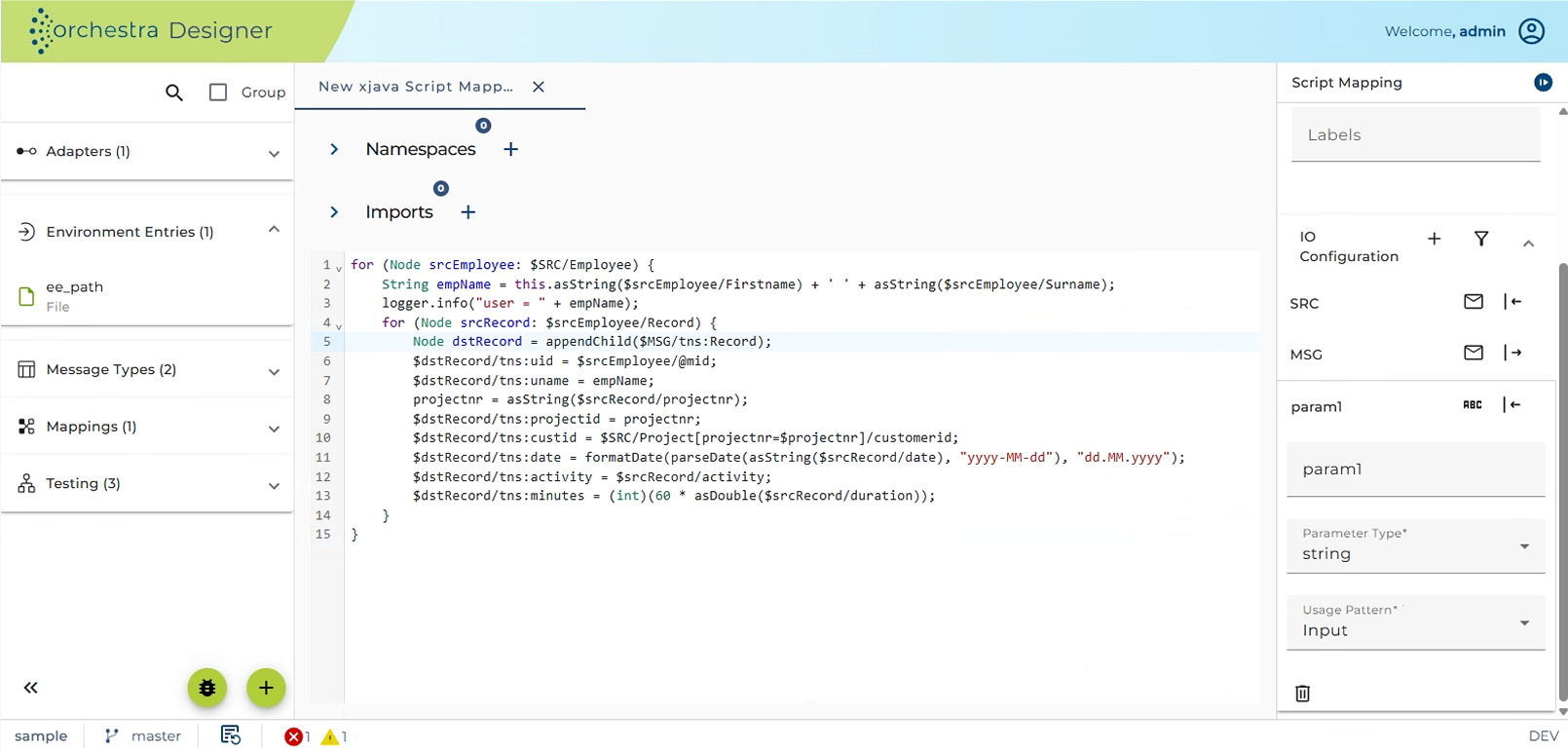
This example shows in the Parameters area an additional variable projectnr. Because an Extended Java mapping is basically Java code you also might define a local variable in the editor area like the variable empName in our example. But then the variable is not visible to the XPath engine. Because the variable projectnr is used in the XPath expression $SRC/Project[projectnr=$projectnr]/customerid, it must be defined in the Parameters area.
The example shows how to build up a structured message using two nested loops. This resembles the structure of the source message type having two levels.
The outer loop runs through the set of all Employee nodes using a for loop. Then the name of the Employee is build using two simple XPaths.
The inner loop then runs through every Record under the current Employee node.
Using the option Typed target
In an Extended Java mapping you define a procedure creating the target message structure. This procedure creates the message independently of the structure which is defined in the message type. To be sure that the created message actually resembles the structure of the message type selected as target message type you may select the checkbox Typed target.
Note that this option costs additional storage and computing performance.
Invoking another mapping using a mapping proxy
Orchestra allows to generate static java methods to invoke a mapping, so-called mapping proxies. These methods can then be invoked from a procedural mapping:
If you generate the mapping proxies so that the input parameter is a DOM element, you can call such mappings directly from your extended java mapping. E.g.:
$DOCTOR_MSG/tns:PV1 = my.com.CallMapping.mapDoctor($SRC/doctor);
See mapping proxies for more detailed information.
Available functions
In the Extended Java mappings, you can use a set of predefined mapping functions. These functions are implemented as static methods of class InternalMappingFunctions. For each mapping a Java class is generated which inherits from the base class ProceduralMapping which in turn inherits from InternalMappingFunctions.
The following additional methods are defined in ProceduralMapping which may be useful in an Extended Java mapping.
Getting the value
-
String asString(NodeSet nodeset)convert a node set according to the XPath rules into a string. If the node set contains only one node the text content of the node is returned. -
Double asDouble(NodeSet nodeset)convert a node set according to the XPath rules into a numeric value, specifically into a floating point number of type double. -
Long asLong(NodeSet nodeset)convert a node set according to the XPath rules into an integral value of type Long. If the node set is empty return null. Throws an Exception if the string value doesn't represent a valid integral number. -
int asInt(NodeSet nodeset)convert a node set according to the XPath rules into an integral value of type int. Throws an Exception if the node set is empty or if the string value doesn't represent a valid integral number. -
Node asNode(Object value)value must be a Node, a NodeSet or a Message. The function returns the first nod of the node set resp. the root node of the message. -
NodeSet selectR (Message msg, XPath path) -
NodeSet selectR (Node node, XPath path)applies the XPath on the node resp. the root node of the message and returns the resulting node set. These statements are normally generated from embedded XPath expressions. The prefixes used for namespaces must have been declared in the mapping editor. -
NodeSet selectChildrenR (Message msg, String namespace, String tagName) -
NodeSet selectChildrenR (Node elemParent, String namespace, String tagName)returns the set of all children of the root node having the given name. If the namespace argument is null, then the methods uses the namespace assigned to the prefix of the tagName argument.
Adding and removing Nodes in the DOM tree
The following functions serve to removes and add nodes to the target DOM tree. They are not allowed on the source message of the mapping because in Orchestra a message must never be changed.
-
void remove(NodeSet nodes)removes all nodes of the node set from a DOM tree.
Typically this is used together with an XPath e.g.remove($MSG/tns:Record[tns:ident=$RID]/tns:name)to remove the name field of a specific Record node. -
void remove(Node nodes)removes a node from a DOM tree. Only allowed on the target message. -
Element insertBefore(Node following, String namespace, String tagName)inserts a new element in the DOM tree before a given node.
This may be helpful if you want to extend an existing message and need to add an element at a particular position. Typically, this is used after an XPath assignment $MSG = $SRC.
When you use the Typed target mode this is hardly ever necessary because the Typed target mode inserts nodes at the correct position according to the message type. -
Element appendChild (Message message, String namespace, String tagName)adds a new node to the end of the message, that means as last child of the root node; returns the new node (an Object of type org.w3c.dom.Node) -
Element appendChild (NodeSet nodes, String namespace, String tagName)adds a new node as last child node to the first node in the node set; returns the new node. The node set must contain exactly one node. If not an Exception is thrown. Typically, this method is called implicitly by the preprocessor. E.g. you can apply the XPath$NODE/Record/Personusing the codeappendChild($NODE/Record/Person). The preprocessor then will create the source code appendChild(selectL(NODE, new BaseXPath("Record")), null, "Person"). -
Element appendChild(Node parent, String namespace, String tagName)adds a new node as last child node to the given parent node and return the new node. -
Element appendChild(NodeSet nodes, String namespace, String tagName, String value)adds a new node with the given text value as last child node to the node in the node set and return it. The node set must contain exactly one node. If not an Exception is thrown. -
Element appendChild (Node parent, String namespace, String tagName, String value)adds a new node with the given text value as last child node to the given parent node and return the new node. -
Element addChildElement(NodeSet nodes, String namespace, String tagName)The node set must contain exactly one node. Typically, this method is called using an XPath e.g.addChildElement($NODE/Record, "", "Person"). In typed target mode, a new element is added to the first node of the node set at the appropriate position. If the typed target is not set is simply callsappendChild. -
Element addChildElement(Node parent, String namespace, String tagName)In typed target mode a new element is added to the node at the appropriate position (according to the message type). If typed target is not set is simply callsappendChild. -
Element createElement (Document doc, String namespace, String tagName)is rarely used because normally you use XPath or the methodsappendChildoraddChildElementto add a new Element. ActuallycreateElementis called implicitly by these methods. -
NodeSet selectL (Message msg, XPath path) -
NodeSet selectL (Node node, XPath path)applies the XPath on the node resp. the root node of the message and returns the resulting node set. If a node name referenced from the XPath, doesn't exist in the document, then it will be created automatically! These statements are normally generated from embedded XPath expressions. The prefixes used for namespaces must have been declared in the mapping editor.
NodeSet selectChildrenL (Message msg, String namespace, String tagName)
NodeSet selectChildrenL (Node elemParent, String namespace, String tagName) returns the set of all children of the root node having the given name. If the namespace argument is null, then the method uses the namespace assigned to the prefix of the tagName argument. If no child with the given name exists, then a child with that name will be created automatically!
-
void assign (NodeSet target, NodeSet source)every node from the node set gets a new content copied from the first node of the source argument. If source is empty, then nothing is done, if source has more than one node an exception is thrown. Invocations of this method are generated if the source code contains assignments of the form $DST = $SRC. -
void assign (NodeSet target, Node sourceNode)every node from the node set gets a new content copied from the source node. -
void assign (NodeSet target, Number value) -
void assign (NodeSet target, XMLGregorianCalendar value) -
void assign (NodeSet target, int value) -
void assign (NodeSet target, String value)every node from the node set gets the value argument as new text content. -
void copyContent (Node target, Node source, boolean inheritNs)copies the complete content from the source node to the target node. In most cases you should prefer assignments like $target = $source. The method may be useful, if the namespace has to be adapted in the course of copying the content. Then you must set the parameter inheritsNs to true. This causes the source structure to be copied, while every child node gets the namespace of the target node.
Other functions
-
Document getDocument(Message msg)get the DOM tree stored in the message. It is represented by an object of class org.w3c.dom.Document. Necessary if you want to access the DOM tree using plain java. -
boolean exists(NodeSet nodeset)Check if a node exists, that means if a node set is empty.
This method is typically used together with an XPath, e.g. if(exists($node/ns0:ident)) { String ident = asString($node/ns0:ident); } -
int count(NodeSet nodeset)return the number of elements in a node set.
This method is typically used together with an XPath, e.g.int recordCount = count($node/Record); -
void registerMessage(String varname, Message msg)If you want to access a message using XPath you must register the message at the XPath engine using this function. For all the messages being parameters of the mapping this is done automatically as well as for the target message. But if you acquire a message through any other means, e.g. by calling a adapter, you must call this method. -
String stringJoin(NodeSet nodes, String delimiter)join the text values of the nodes contained in the node set. The values are delimited by the given delimiter in the result. -
String lookupInLookupTable(String nameOfLookupTable, String key)lookup a value in a scenario element of type Lookup table. -
String getMappingName()returns the name of the mapping. -
String getScenarioIdentifier()returns the unique id of the scenario where the mappings belong to. -
Object getGlobalVariableValue(String name)returns the value of an Environment entry of type Global variable. The name parameter is the name of the Environment entry. Throws a ConfigurationException if no global variable with that name exists.