SAP Server
Descriptions
Environment entries for a SAP server connection are used to declare the parameters to access the gateway of a SAP system via Remote FunctionShape Call(RFC). The entry declares the access point at a SAP system to receive messages.
Please note that Orchestra's SAP adapters use the SAPJCO libraries from SAP. Since we can not assume that these libraries exist in every system, the SAP adapter is switched off by default.
If you need to use SAP adapters, the configuration parameter sap.jco.enabled in the configuration group adapter must be switched on, see How to enable SAP adapters.
Purpose of object
It is commonly used to declare the parameters for the SAP RFC Receiver. The adapter receives data from a SAP system.
Configuration
 |
|---|
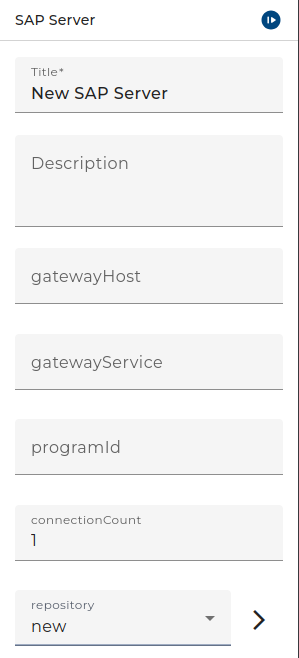
| Base view of the environment Entry SAP Server |
Step by Step
-
Create an Environment entry of type SAP server connection.
-
Select the Gateway host: Add the host or IP of the gateway you want to access at SAP system, e.g. sdcsta10.charite.de or 192.168.2.6.
-
Select the Gateway service: Add the port or name of the gateway service, on which Orchestra will access the SAP system.
-
Select the Programm-ID: Register I'd of the RFC server program at SAP gateway, e.g. ORCHESTRA.
-
Select Connection count: Maximum number of connections that can be active at a time.
-
Select repository: To read the received messages from SAP system in the right way, it is necessary to fetch the IDOC file from SAP. This file declare the syntax of received messages. Therefore, an authentication at the SAP system is necessary, which can be done by an environment entry of type SAP client. With these parameters it is possible to fetch the required information.
-
Click Test: An alert window will appear, which shows whether the test of the connection was successful.
8.If the test was successful, click on Finish.