TCP Sender
Description
This channel implements a TCP Sender that can be used to send data to any external client or server. The channel operates in the following modes:
-
Synchronous mode: data is sent to an external client or server and the channel waits for an acknowledgment (response).
-
Asynchronous mode: Data is sent without awaiting acknowledgment.
The default mode, when not using frame handling, only works in this mode. However, user-defined and fixed-length frame handling works with it.
This channel can be used for the following purposes:
-
Simple TCP/IP communication based on a protocol without frame handling.
-
User defined TCP/IP protocols based on user defined frame handling.
-
TCP/IP protocols based on fixed length frame handling.
Creation
To create a TCP Sender channel, follow the steps described in the general description of Scenario Elements.
Configuration
The dialog to configure the TCP Sender channel looks like this
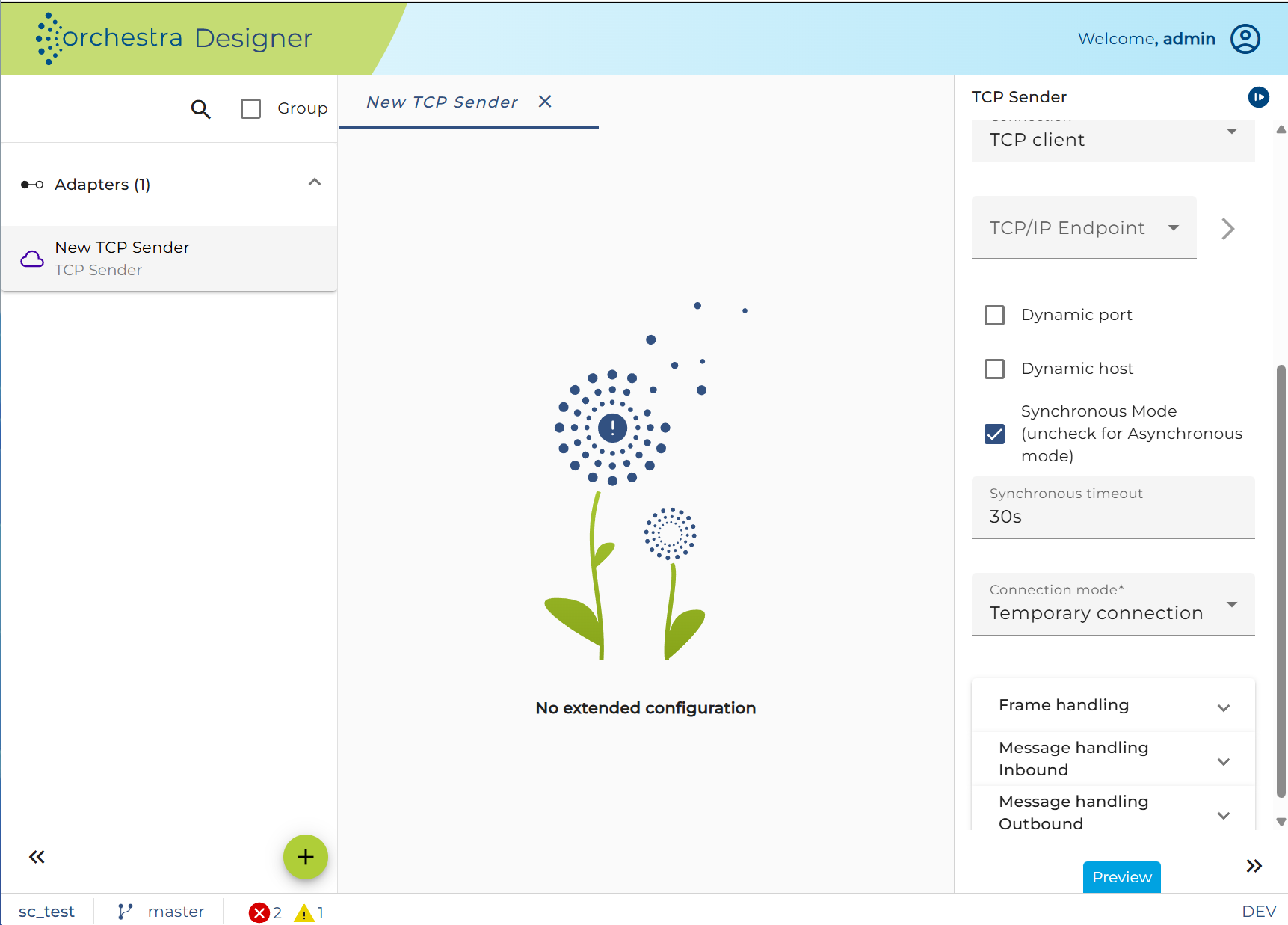
| Setting | Description |
|---|---|
| Connection | Options: - TCP client: the channel initiates a connection. - TCP server: the channel accepts a connection. In almost all cases, you will choose to work as a client. |
| New or Edit | Create or edit an environment entry of type TCP/IP connection, defining the server address and port. If you select temporary connection mode and TCP client, you can set the host and port dynamically when calling the channel. This allows dynamic server addresses and ports. - Dynamic port: Adds a new input parameter "port". - Dynamic host: Adds a new input parameter "host". |
| Synchronous Timeout | Only available when using synchronous mode. Available time units: milliseconds, seconds, minutes, hours, and days. |
| Mode | Defines the basic message exchange pattern of the channel: - Synchronous: Waits for a response message for the time defined in synchronous timeout. - Asynchronous: Data is sent without waiting for a response/acknowledge. Runs without frame handling in default mode. |
| Connection Mode | Choose the connection mode: - Durable: Connection is created once and used for all channel invocations. - Temporary: For each channel call, a new connection is created and closed when the message is transferred. Only in Temporary mode, dynamic hosts and ports are available. |
| Frame Handling | Default mode without frame handling: No synchronous mode. The channel sends the whole TCP stream at once and closes afterward. - Fixed length frame handling: A fixed length of the message is used, and unused space is filled with a defined fill char (standard is 0x00). - User-defined frame handling: Can be implemented using a Java Source. The frame works with specific start and end frame characters. |
| Frame Handler | You can edit the frame handler by clicking the edit button. In User-defined frame handling, insert the name of the Java source class. In Fixed length frame handling, you can adjust the message length and define the fill char. |
| Message Handling | Defines how Orchestra treats the content transfer: - Within the request message serialization section, the format of the request data is defined. Choose a serializer for the request message. - Within the response message de-serialization section, the format of the response message is defined. Choose a deserializer. Parsing modes: - Parse on creation (default): Data is parsed during byte stream reading. - Parse on demand: Data is read in binary without interpreting it, and parsing occurs when the message is accessed. |