File Writer
Description
This channel is used to write a message to a single target file.
Purpose of object
Writing a message can be done to a local or remote target. Different serializers may be used to create the desired format.
Creation
To create a File Writer follow the steps described in the general description of Adapters
Configuration
The dialog to configure a File Writer looks like this:
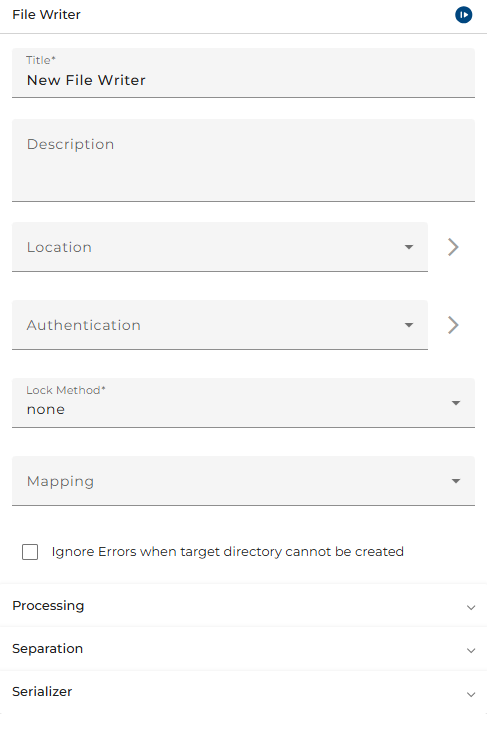 |
|---|
| Base view of the channel file writer |
Location: Choose an appropriate environment entry.
Authentication: (Optional) Choose a user for log in. This user must be created before.
Lock Method: To avoid that the file content is written or changed otherwise by another application the user may select and configure a file locking mechanism here.
Mapping: The message can be transformed by a mapping. Subsequently, it will be written in the file using the specified serializer.
Processing
Mode: This channel can:
-
Create/Overwrite files
-
Extend files
-
Throw errors if a target file already exists
Work suffix: The suffix to be appended to the target file during processing phase.
Replace file extension: Specify whether the work suffix will replace the file extension or simply be appended.
Lock Method Details
Depending on the chosen Lock Method mechanism there are additional details to be configured, like:
- Lock tries: maximum number of times the mechanism will try to acquire a lock
- Retry duration: (minimum) period between two attempts, will be increased with every negative attempt
- File name: name of dedicated lock file to be generated to lock an entire directory
- Lock file pattern: file name pattern to be used for generating dedicated lock files
- Lock script: script that explicitly handles locking
- Lock directory: option to lock the entire directory
Separation
Depending on the chosen separation mode, a specific Separator string can be defined that will be inserted to separate the different messages in the target file.
Mode:
- none: does not use a separator at all
- append: adds the specified separator at the end of a message always
- separate: inserts the specified separator between messages only
Separator: The string to serve as a separator between different messages in the file.
Serializer
Serializer type: Serializer to be used to generate the output format.
How Orchestra works
-
The file name of the output file is generated. If a work suffix is defined and the checkbox "Replace file extension" is selected, the target file's extension will be replaced by the work suffix. If a work suffix is defined, while the checkbox is not selected, the work suffix will be appended to the target file name. If the target file already exists, the work suffix will be appended to the existing file (Orchestra does not copy the existing file).
-
If necessary, subdirectories will be created.
-
The output stream with the same mode as specified in the configuration is created (the file with the file name created above is created).
-
If a mapping is selected, the mapping will be performed now.
-
The message is written, and, if specified so, the separators will be added.
-
The outbound stream is closed.
-
If a work suffix has been used, it will be removed finally.
See also
To set up a user/authentication, go to Credentials
To set up a filepath an environment entry must be created