Database BLOB Reader
Description
This adapter is used to read BLOBs ( Binary Large Objects) out of a database.
Configuration
The dialog to configure the Database BLOB Reader looks like:
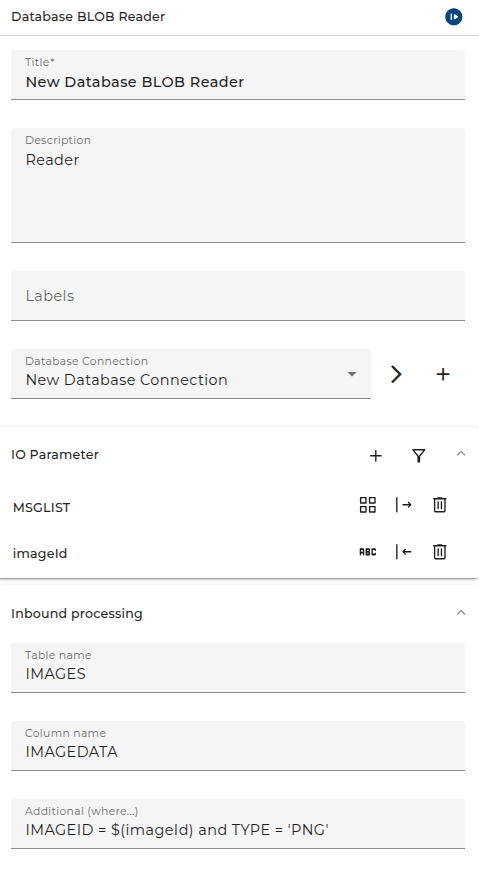
The adapter returns a message list containing the BLOBs read from the configured BLOB column. As you can see, the user can define additional parameters which then can be used in the where condition of the statement.
Step by Step
- Database - Select the appropriate database connection. The database connection has to be created as environment entry (database connection).
- Properties - Defines all variables that are passed to/returned from the adapter.
- Table name - The name of the table to read
- Column name - the name of the column to read. The column must have type BLOB, CLOB or similar. The exact type depends on the database. The type must allow to call the JDBC method
getBinaryStream(<columnname>)on the result set. - Additional (where ...) - the where part of the generated SQL statement; used to filter the records you want to read from the table. As in the example above you can reference parameter values using the syntax
$(<parametername>) - Deserializer - the deserializer used to read the column data. In many cases you will use the binary reader here.