Throw
Description
Sends a Signal.
Purpose of object
Another process can be started or reactivated by sending a signal.
Create
-
Create a process model
-
Then point the mouse on "process", as default, this field is on the right side of the Orchestra window.
-
Click on the folder intermediate events to see its content.
-
Click on "throw".
-
Click on any place in your process model.
-
Double click on the throw element to specify the outgoing signal.
Icon

Throw event
Configuration
-
Click on the throw element to specify the outgoing signal.
-
Choose a process signal from the drop-down list.
-
Specify event properties.
In the following diagram the configuration of the process signal is shown.
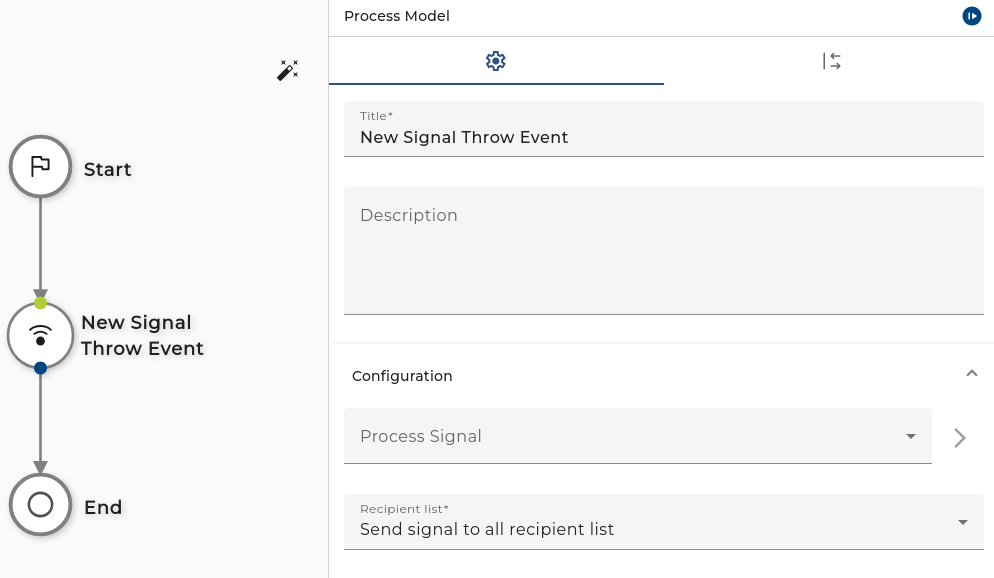
When working with standard settings, the selected signal is sent to all recipients that are subscribed to the same signal. This mode is important, when the sender of a signal wants to ensure that all recipients receive the same information without any limitation.
In another case, the sender wants to control the set of recipients that are allowed to receive a signal. If this mode has to be used one has to select "Use a dynamic recipient list" in the recipient list combo box. As the name says, the sender has to hand over a list of possible recipients that will receive the signal. In the following, the configuration of the signal-parameters together with a dynamic recipient list is shown.
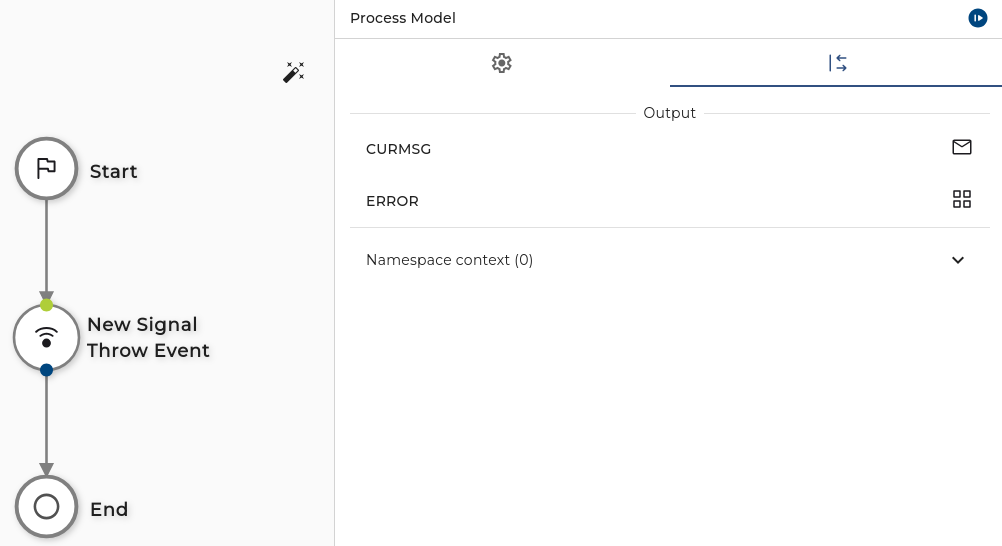
When the dynamic recipient list mode is active, the additional parameter RECIPIENTLIST is visible. This parameter receives all the settings and restrictions that are used to determine possible recipients of a signal. The implementation of a recipient list is based on the idea of "fluent interfaces", whereby fluent interfaces are written like a sentence from a natural programming language.
First of all, a recipient list works in two different modes. When the recipient list is created with the method "publishSignalOnly()" it is set to the white list mode. This means only recipients get a signal when they are explicitly listed in the recipient list. On the other hand, when the recipient list is created with the method "publishSignalToAllBut" it is set to black list mode. This means all recipients that are not explicitly listed will receive the signal.
After creating the recipient list, one has to specify all the possible restrictions or receivers. Since the api is defined as fluent interface you can invoke further methods on the recipient list object that define the restrictions.
Currently, the following restrictions (expressed by a method call) are supported for recipient list in whitelist mode:
| Method | Description |
|---|---|
| toCell(<cellname>) orToCell(<cellname>) | Add a filter that addresses a cell explicitly by its cell name. |
| whenCellNameMatches(<regular expression>) orWhenCellNameMatches(<regular expression>) | Add a filter restriction that addresses all cells with a cell name matching the regular expression. |
| toCellWithTag(<celltype>) orToCellWithTag(<celltype>) | Add a filter that addresses the possible target cells by specifying a cell label explicitly. The cell type matches when the type is contained in the list of tags for the relevant cells. |
| whenCellTagMatches(<regular expression>) orWhenCellTagMatches(<regular expression>) | Add a filter restriction that addresses all cells with a cell type matching the regular expression. |
| toLocalNode() | Add a filter that addresses the local node as recipient of a signal. |
| whenMatches(<tagRegEx>, <nameRegEx>) orWhenMatches(<tagRegEx>, <nameRegEx>) | This is the most flexible restriction. A restriction applies when the given regular expression matches the cell tag and name at the same time. |
| andOnlyToScenario(<scenarioid>) | Add a filter that addresses a scenario by its unique scenario identifier. This filter is evaluated on each cell node that receives the data. |
Currently, the following restrictions (expressed by a method call) are supported for recipient list in blacklist mode:
| Method | Description |
|---|---|
| toCell(<cellname>) andNotToCell(<cellname>) | Add a filter that addresses a cell explicitly by its cell name. |
| whenCellNameMatches(<regular expression>) andNotWhenCellNameMatches(<regular expression>) | Add a filter restriction that addresses all cells with a cell name matching the regular expression. |
| toCellWithTag(<celltype>) andNotToCellWithTag(<celltype>) | Add a filter that addresses the possible target cells by specifying a cell label explicitly. The cell type matches when the type is contained in the list of tags for the relevant cells. |
| whenCellTagMatches(<regular expression>) andNotWhenCellTagMatches(<regular expression>) | Add a filter restriction that addresses all cells with a cell type matching the regular expression. |
| toLocalNode() | Add a filter that addresses the local node as recipient of a signal. |
| whenMatches(<tagRegEx>, <nameRegEx>) andNotWhenMatches(<tagRegEx>, <nameRegEx>) | This is the most flexible restriction. A restriction applies when the given regular expression matches the cell tag and name at the same time. |
| andNotToScenario(<scenarioid>) | Add a filter that addresses a scenario by its unique scenario identifier. This filter is evaluated on each cell node that receives the data. |
The following examples should give how the recipient list works:
| ExpressionShape | Description |
|---|---|
publishSignalOnly().toCell( "ORCA" ) | The signal is only sent to a cell with name ORCA. |
publishSignalOnly().toCell( "ORCA" ).<br/>andOnlyToScenario( "f9519726-98ee-425a-bf59-4fc69fb2f489" ) | The signal is only sent to a cell with name ORCA, and only the scenario with identifier f9519726-98ee-425a-bf59-4fc69fb2f489 receives the signal. |
publishSignalOnly().toCell( "ORCA" ).<br/>orToLocalNode().andOnlyToScenario( "f9519726-98ee-425a-bf59-4fc69fb2f489" ) | The signal is only sent to a cell with name ORCA and to the local node. On both nodes, only a scenario with identifier f9519726-98ee-425a-bf59-4fc69fb2f489 receives the signal. |
publishSignalToAllBut().toCell( "ORCA" ) | The signal is only sent to all cells but ORCA. |
publishSignalToAllBut().toCell( "ORCA" ).<br/>andNotToScenario( "f9519726-98ee-425a-bf59-4fc69fb2f489" ) | The signal is only sent to all cells but ORCA. The scenario with identifier f9519726-98ee-425a-bf59-4fc69fb2f489 is excluded. |
publishSignalOnly().toCellWithTag( "MATERIAL" ) | The signal is only published to all cells that have the attribute runtime.cell.type set to "MATERIAL". |
publishSignalOnly().whenMatches( ".*" ,"O.*" ) | The signal is sent to all cells whereby the cell name starts with the prefix O. |
publishSignalOnly().whenMatches( ".*MAT.*", "O.*" ) | The signal is sent to all cells whereby the cell name starts with the prefix O and the runtime.node.label contains the fragment MAT. |
The filters for cell name and cell tags are evaluated on the sending Orchestra node. If such a filter doesn't match, the target cells do not receive any data. Only scenario filters are evaluated on the remote Orchestra nodes
For each Orchestra node, the local label has to be defined. This is done with the parameter runtime.node.label environment parameter.
For each cell configured on an Orchestra node, the label has to be specified for each cell connection separately (See Administration of a cell connection)
Only when a cell connection is created automatically the labels are created automatically on the basis of the configuration of the involved nodes.