LDAP connection
Description
Environment entries of type LDAP connection are used to declare the parameters to access a directory server. They define a connection between Orchestra and a Server which uses the LDAPv3 protocol and its data structure matches the LDAP specification.
Purpose of object
It is e.g. used for channels LDAP Reader and LDAP Writer to define the parameters to access a directory server.
Configuration
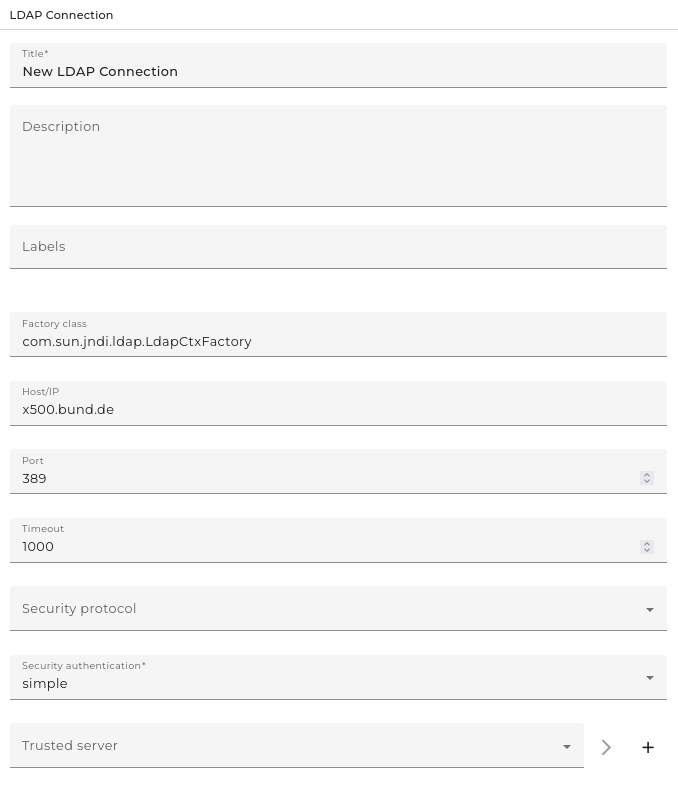
Step by Step
- Create an Environment entry of type LDAP connection.
- Select the java factory class: This class is by default the LdapCtxFactory but can also be changed to any class implementing the interface: javax.naming.spi.InitialContextFactory.
- Fill in the host or IP of the intended server, e.g. ldap.example.com or 192.202.185.90.
- The port is set by default to 389, but can be changed.
- Set the Timeout.
- Select Security Protocol: Choose whether to use the transport layer security to encrypt the transferred data.
- If a security protocol is selected, choose a Trusted server to connect with. Therefore, create Credentials of type trusted server and add the intended keypair.
- Select the mode of the security authentication.
- simple: simple authentication
- GSSAPI authentication: if you want to select the authentication through the Generic Security Services Application Program Interface, you first need to enable it (see Enabling GSSAPI below).
Enabling the Generic Security Services Application Program Interface (GSSAPI)
Requirements:
- Java 2 Platform Standard Edition (J2SE) 1.4 or JNDI 1.2 with ldapbp.jar
- Java Authentication and Authorization Service (JAAS)
- Java Cryptography Extension (JCE)
- an RFC 2853 compliant implementation of Java Generic Security Service (JGSS)
- an implementation of Kerberos, version 5
- Open Apache Tomcat.
- Open the Properties configuration dialog.
- Add the following parameters to the Java options:
-Djava.security.auth.login.config=gssapi_jaas.conf \
-Djava.security.krb5.conf=krb5.conf \ GssExample [qop [dn]]
| Parameter | Description |
|---|---|
-Djava.security.auth.login.config | Indicates which JAAS login module the application needs to use. |
-Djava.security.krb5.conf | Configures the Kerberos subsystem. Set the path to the Kerberos configuration file. |
| qop | Comma separated list of tokens, each of which is one of auth, auth-int, or auth-conf. If no token is supplied, the default is 'auth'. |
- Select Apply.