Azure Client
Description
Environment entries of type Azure Client are used to declare the parameters to access mails on the Microsoft azure platform via Microsoft Graph APIs.
Purpose of Object
It is used by the environment entry Email server connection of type Microsoft Graph to define the parameters to access the Microsoft Azure platform.
Configuration
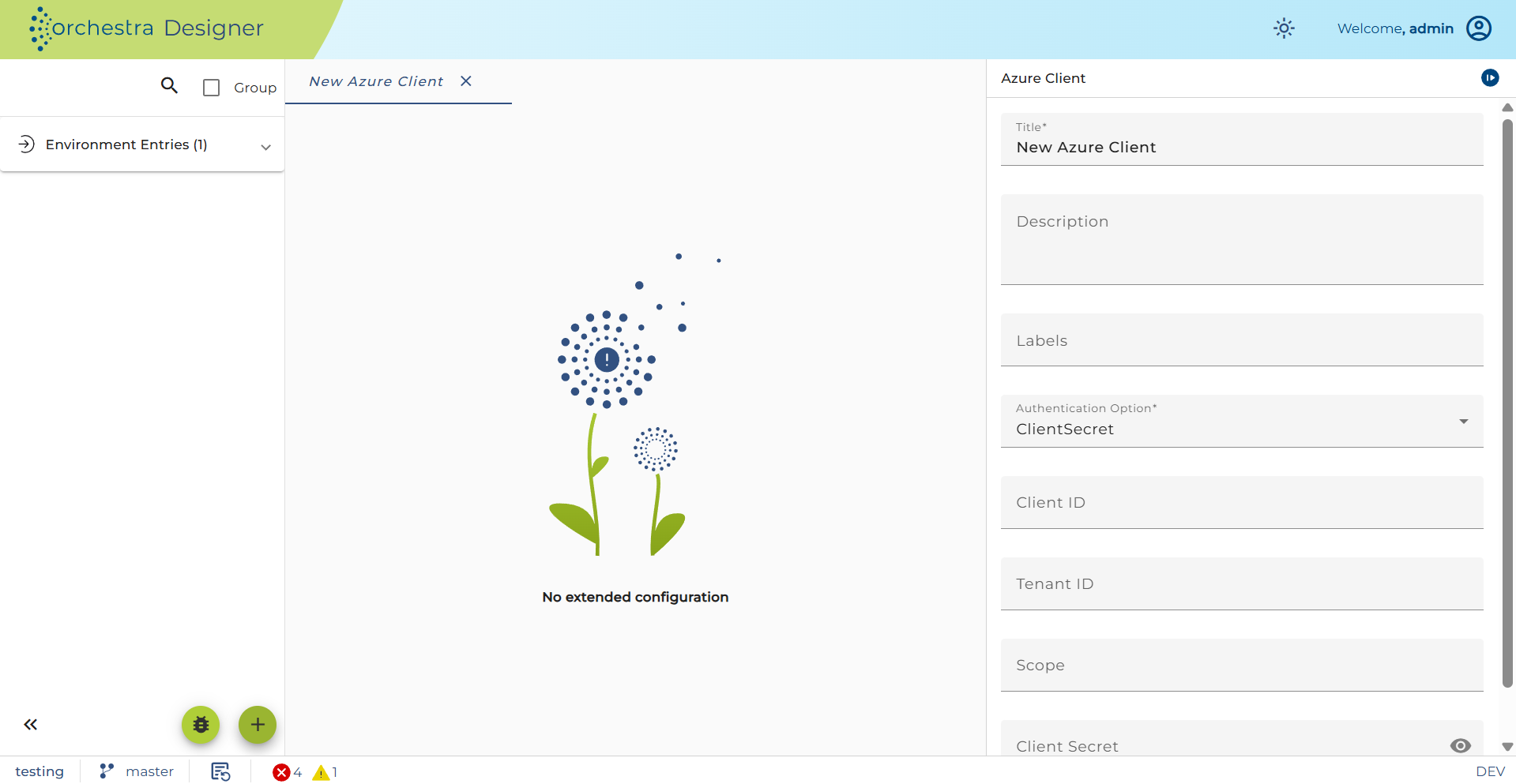
Step-by-step
-
Create an Environment entry of type Azure Client.
-
Choose an Authentication option:
ClientSecret— authenticate with a client secret.ClientCertificate— authenticate with a certificate.UserPassword— authenticate with username and password.OnBehalfOf— authenticate with a client secret and an access token.
-
Set Client ID — the application (client) ID of the registered Azure app.
-
Set Tenant ID — the directory (tenant) ID of the registered Azure app.
-
Set Scope — the required scopes/permissions. For multiple values, separate with commas:
- Send mail only:
Mail.Send - Send + read/write mail:
Mail.Send,Mail.ReadWrite
- Send mail only:
-
If using
ClientSecretorOnBehalfOf, set Client Secret — the secret string of the registered application used to request a token.