S7 Listener
Description
The S7 listener is an inbound channel and reads data from a SIEMENS Simatic S7 (PLC). There are five different modes the listener can work in. They are described along with the Mode configuration.
To use the S7 listener the properties described in the Configuration section have to be configured.
Configuration
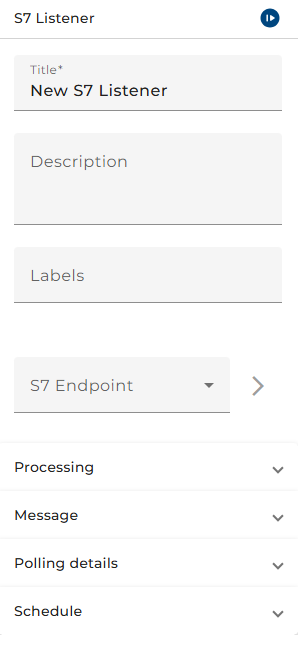
The dialog to configure the S5 listener basically looks like this:
 |
|---|
| Base view of the S7 listener configuration |
S7 Endpoint
A valid S7 environment entry must be selected (or created first). The configuration of the environment entry itself is described in the chapter above.
Processing
Start error process:
If the channel encounters an error you can connect it in the process model with an error start event to create a process instance for handling that error.
If you leave the error hold time field as blank then the process instance will be created every time an error occurs. If errors occur rapidly, a lot of process instances will be created. You can avoid this by entering a period of time in the field. Any further errors occur within this period, no further error process instance will be created.
Message
Message type
An S7 message type has to be selected. Only S7 message type are listed. How to create a S7 message type is described in the chapter above.
The rest of the properties is passed through parameters during the call of the channel:
Data block
A data block is a unit in the PLC which contains data. In the field, the id of the data block must be configured. The id is a positive integer.
Offset
An initial offset for the data block defines how many bytes the origin of the variable nodes gets shifted from the initial origin of the data block. The offset of the variable itself gets added on top.
Polling details
Mode
There are five different modes the listener may run in.
Start when memory changes
In this mode the listener checks for changes in the PLC and is triggered when changes are discovered. The listener searches only for the values from the message type section.
Listen for changed toggle field value
The listener checks if a specific value from the message in the PLC for the given Toggle field of the message type exists and compares it to the specified value in the field Compare to. After the value is read, it will be overwritten with the value of the field Write.
Read values on every polling event
In this mode the listener reads data at the specified Schedule and returns the data.
Read only changed memory
In this mode the listener checks for changes in the PLC and is triggered when changes are discovered. The listener searches only for the values from the message type section. Different to the mode 'Start when memory changes', only values that changed compared to the previous read are added to the resulting message.
Read memory block if toggle field's value changes
In this mode the listener observes the given Toggle field. Whenever the value of this field changes, the full data block described by the message type is read from the PLC.
Schedule
In this configuration, the polling interval can be set up. This defines how often the listener will check for changes in the variable value.