Mongo DB Reader
Description
The MongoDB Reader is a channel which can read documents from a MongoDB. The filtering can be customized and it is possible to add dynamic parameters that can be set at runtime. The channel returns a JSON message.
Creation
To create a MongoDB Reader follow the steps described in the general description of Channel.md
Configuration
The dialog to configure the Database Reader looks like:
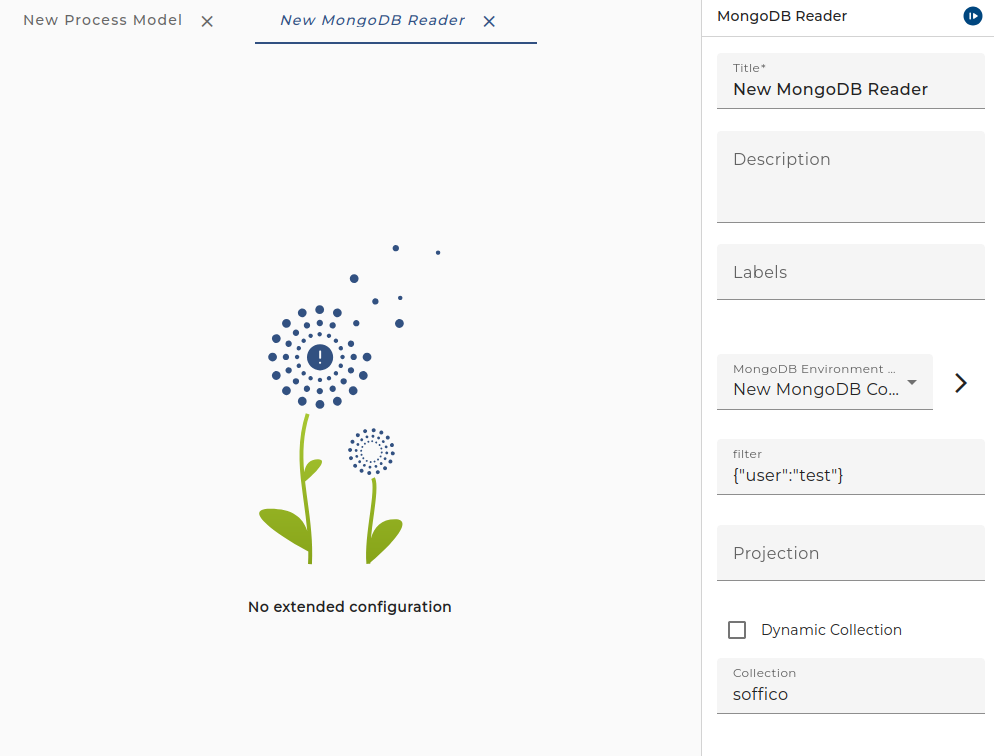
- Database The selected database connection.
- Filter Add a filter for your documents. See the official MongoDB documentation for examples: Query your data
In the filter text you may add variable references in the form
$(name). E.g. if you enter a filter{"user":"$(username)"}the channel gets a new input parameter named username. - Projection Projection specification. See the official MongoDB documentation for examples of projections: Set which fields are returned
In the projection text you may add variable references in the form
$(name). E.g. if you enter a projection{"_id":0, user:1, "status": $(showStatus)}the channel gets a new input parameter named showStatus. - Collection is set by parameter If checked the collection is set in the Call otherwise the collection is set in text field.
- Collection the collection from where to read the document