FTP Operations Adapter
Description
This adapter is used to execute a list of file operations on a FTP server including the reading and writing of files. FTP, SFTP, FTPs are supported by this channel. If you would like to use a FTP channel, you will necessarily require a user credential having the access rights to the respective FTP-Server. In order to create a user credential within Orchestra please refer to the Credentials section.
Creation
To create this scenario element follow the steps described in the Channels section.
Configuration
The configuration of the adapter is done in 3 locations:
- The main channel configuration properties (title, description, label, parameter definitions)
- A list of commands to execute configured in the big content area in the middle (used to add, remove or change the order of commands).
- The command detail configuration
Configuration 2 and 3 are equivalent to File Operations channel and therefore aren't repeated here.
The main configuration dialog for this adapter looks like this:
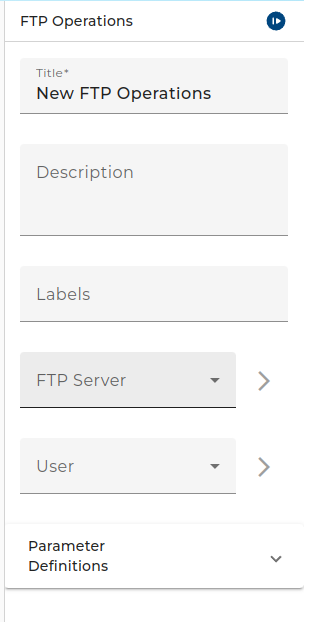 |
|---|
| Main FTP operations adapter configuration |
- FTP Server: Environment entry determining the FTP server connection details
- User: Credential containing the user used when authenticating at the FTP server
- Parameter definitions: Parameters used in the channel (can be selected in the command later)