Database Target
Description
A Database Target channel is an adapter to change database contents.
The channel has two basic modes:
-
It can write a structured Message directly to the database, where each complex element of the message represents a record to be written to the database.
-
It can implicitly perform a Orchestra mapping during its execution, whose result elements are written directly into the database while the result is created.
-
In case you don't want to use Orchestra Mapping you can select in the channel dialog a message type together with a target key.
⚠️ Note: The target data type must be imported directly from a Database Dictionary or from a Valuemation repository! Otherwise the channel doesn't know the names of the target tables and columns. For more detailed information about message types please refer to Message types. Here you also find details about how to import message types from a or from .
A simple example
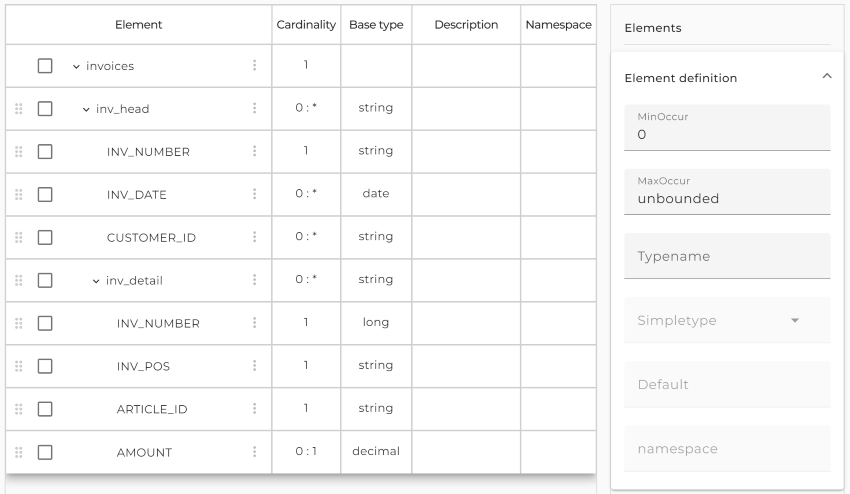
Assume we have two database tables containing information about invoices. First we have a table INV_HEAD representing the invoice and a table INV_DETAIL representing an invoice item. If we import the two tables as a message type from the database it looks like:
 |
|---|
| Message type imported from a database |
As you can see, the message type contains additional information, like the column name. This information is used from the Database Target channel to create SQL statements.
If you configure the Database Target channel with this type it looks like:
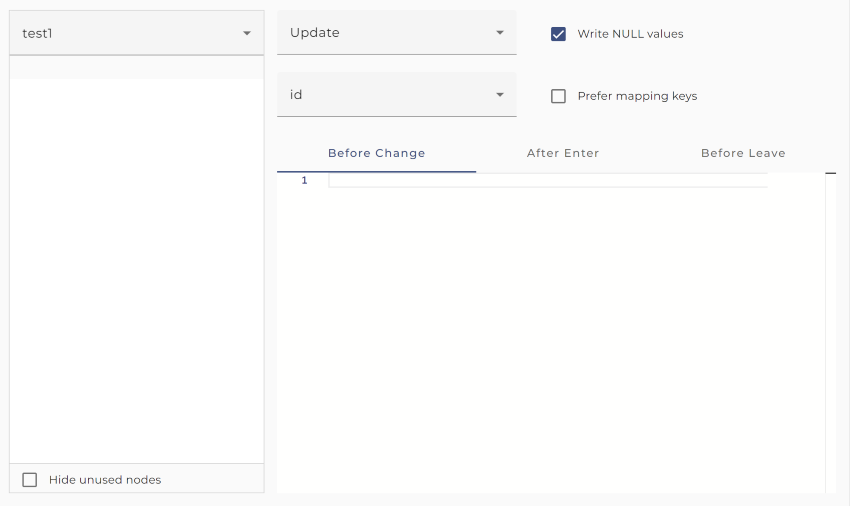
If the channel is invoked with a message of the given type, it traverses the elements of the message and for each invoice it encounters, a record is written to the database table INV_HEAD and for each invoice item it encounters, a record is written to the table INV_DETAIL. Actually the name of the table is contained in the message type as annotation table name assigned to the record elements and the names of all columns are added as annotation column name to each simple attribute. These annotations are added to the message type when it is imported from the database or from Valuemation.
A data record can be written to the database in several modes. For example a record can simply be added to the database table executing an insert statement. In the example above the table INV_HEAD is selected. On the right you see that for this table the mode Replicate is selected. For every table the user can select a different mode. Replicate means that the record is updated if it exists and inserted into the table if it doesn't exist. To find out if the record exists, the channel either executes an update statement or a select statement. In both cases it needs a key definition to create an appropriate where condition. You have to select such a key in the key field under the type tree. If you click on the button with the key symbol a dialog appears showing the columns of the selected key.
Before and after a record is written to the database a script can be executed. For example you may select additional information or change some other tables procedurally. For Details see Trigger scripts .
Working modes
A data record can be written to the database in several modes:
-
Replicate Insert the record or update it, if it already exists. The channel uses two strategies to find out if a record exists:
-
Insert Insert a record by executing an insert statement
-
Update Update a record by executing an update statement
-
Insert New Insert a record if it does not exist
-
Replicate Changes Insert or update data if values have changed
-
Update Changes Update data if values have changed
⚠️ Attention: All modes but the Insert mode, require necessarily a key on the database table. If no key is defined and selected for the table mapping, executing the channel will cause an error, because the channel doesn't know how to identify a record.
Valuemation specific modes
The modes Replicate changes and Update changes are specific for Valuemation databases. If one of these strategies is selected and in Valuemation for the target table the property Enable audit is enabled, then changed values are logged into the according tables
_AMT\_AUDITEDCHG<bankid>_
. Changes will be logged only for those columns for which Enable audit is enabled. So logging of changed values is in effect if Enable audit is set for the target table and the required columns.
Another benefit of using these modes is, that updates are only executed, if actually changed data are delivered from the data source. Therefore the table columns USERCHG and DATCHG are changed only if the record was actually changed. To check if data were changed, the channel has to read all row data from the table. Therefore this mode costs more performance than a simple Replicate or Update .
Trigger scripts
In the DB-Target Channel, a specially designed scripting language for this channel is used. This language is used to define procedures which are executed at certain points while the channel writes data to the database. These procedures are called trigger procedures. There are three types of triggers:
-
Before change Executed before a record is written to the database. Also for the root node a before changed trigger may be defined. it is executed once at the beginning of the channel invocation.
-
After enter Executed after a record is written to the database but before any dependent records have been written to the database.
-
Before leave Executed after a record and all its dependent records have been written to the database.
Note that Trigger scripts are only allowed for tables; in case of attributes resp. columns you can write expressions in the "Before change" tab. See details in the following paragraph.
Operation Order
In the course of writing data records to the database, the DBTarget channel performs a sequence of actions in the following order:
-
The Before change trigger will be executed (if available). The trigger can refer to all mapped attributes using the syntax $(attributname)
-
A select on a target table will be performed, if the mapping mode is Replicate, Insert new, Replicate changes or Update changes.
-
The Attribute Expressions will be evaluated and their values will be assigned to the related attributes. The expressions have access to the mapped attributes as well as to all variables that were set from the Before trigger.
⚠️ Note: Attribute expressions will be evaluated only if the target variable has not yet a value. If the target column is marked as insertOnly in the message type, the expression is only evaluated if the target record doesn't exist. That means also, that in Replicate mode the insert only expressions are postponed until the channel knows that the record doesn't exists (that is after the update statement returns 0)
-
The generated insert or update statements on the target table will be executed.
-
The After enter trigger will be executed (if available).
-
child records will be written to the database, recursively invoking this sequence of actions.
-
The Before leave trigger will be executed (if available).
Creation
To create a Database target channel follow the steps described in the general description of Channels.
Configuration
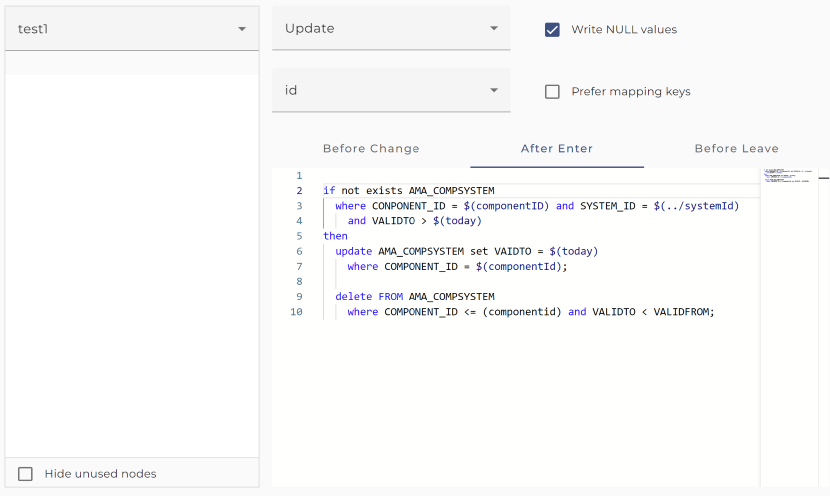
The dialog to configure the Database target channel looks like:
 |
|---|
| Example of a database target channel |
Step by Step
The following section explains the properties which are valid for the whole channel.
-
Database - Select the appropriate database connection. The blank database connection has to be created as environment entry (database connection).
-
Mapping - Select the desired database mapping. You actually don't need to select a mapping. If a mapping is selected, the message given to the channel must match the source type of the mapping. If no mapping is selected, the message must match the selected target type.
-
Target type - Message type created by importing it from the Database. If a mapping was selected it's always the target type of the mapping. Actually, in this case this element is not editable.
-
Type of key generation - The strategy the function newID (see Functions ) has to use when creating a new key. The following values are supported:
-
OracleSequence
- Only available for Oracle databases. In the target database schema, a sequence with the name ORCH_SEQUENCE must exist. The next value of the sequence will be used
-
MaxId
- The key is generated by taking the maximum value of the column of all records in the table and adding one to it.
-
VMHighestKey
- Key generated in the same way as Valuemation.
-
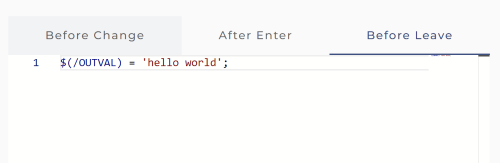
More parameters - Click on this button to open a panel where you can define additional parameters. By default, the channel has the two output parameters MSG and SKIPMAPPING as well as all the parameters defined in the mapping (if the channel is configured to use a mapping). Parameters defined with "More parameters" can only be returned when using Global Variables syntax like e.g. $(/parametername) as shown in the following screenshot:
-
Has result - Indicates if the channel has result message. The result message resembles the data written to the database. It also contains additional information. Specifically
-
key attributes are annotated with the XML attribute isKey,
-
SQL error messages from the database are added to the result message,
-
information set by executing RESULTMSG.
category(see RESULTMSG ) is also added to the result message. -
Max error count - If the internal error count is higher than this value, the channel invocation fails with RESULT status errors. The internal error count is increased by the statement RESULTMSG or whenever an SQL statement fails with an SQL error. In the latter case also an error is added to the result message in the same way as the statement RESULTMSG . The internal error count is returned by the function getErrorCount() (see Functions ).
-
Use batch mode - Try to use database batch mode to increase performance. The benefit of this method is highly database dependent. The property is selectable only if the channel has no result and the type of key generation is not MaxId. Also, this mode is only sensible if there are no select statements interfering the insert or update statements because otherwise no batch of statements can be created and the batch mode will not increase the performance.
-
In batch mode normally the default batch size is 100. Actually, the value is taken from the parameter adapter.dbtarget.max.batch.count from the Orchestra environment settings, so it might be different in Orchestra designer and in the Orchestra runtime. If the user has a developer key the maximal batch size is configurable if you deselect the check box Use default batch size .
-
In the key field under the type tree you must select a key for the selected target table. Only in insert mode you don't need a target key, all other nodes need a key to create an appropriate where part for the update or select statements necessary to write the data to the correct record on the database table. If you click on the button with the key symbol a dialog appears showing the columns of the selected key. If a mapping is selected in the select box labeled Mapping you can select the check box prefer mapping keys . If selected the channel prefers the key configured in the according node mapping of the Orchestra mapping. In rare cases this may be sensible because two node mappings might refer to the same target node but both define different target keys.
-
If the toggle button with the label Show all attributes is selected all attributes of the target message type are shown. If it is not selected only the key fields and the fields having an expression assigned are shown.
Editing table mappings
The relationship between a message element and a database table is called a table mapping. If you select a table element in the tree on left of the channel editor; then you can change the properties of the related table mapping:
-
Mode - Write mode of the table mapping. See paragraph Working modes for details.
-
Write NULL Values This is a check box independently set for every table mapping. If the check box is set all column attributes for which no values are set cause the creation of update statements which set the associated columns value to NULL. E.g. if your table has the columns IDENT, NAME, AGE and the source message only contain values for IDENT and NAME normally the update statement UDPATE
tableset NAME = ? where IDENT = ? is created. IF Write NULL Values is set, then the statement UDPATEtableset NAME = ?, AGE = NULL where IDENT = ? is created. -
Before change trigger, After enter trigger and Before leave trigger. See Trigger scripts for details
-
Elements of the target data type - These corresponds with the tables and the columns of the target database into which the data is written.
-
Target key - Unique identifier of the selected Database Table.
Scripting language
In the DB-Target Channel, a specially designed scripting language for this channel is used. This language is used to define the Trigger scripts which are executed at certain points while the channel writes data to the database.
Language elements
In the following sub chapter, we provide an overview of the language elements in the Database target channel. The Syntax of the language is given in EBNF.
Attribute Expressions
Expressions compute a value which can be assigned to variables or can be used to compose more complex expressions.
Examples:
The formal syntax is described in the following lines:
-
ExpressionShape ::= AddExpression { "or" AddExpression }
-
AddExpression ::= StringConcatenation | NumericExpression
-
StringConcatenation ::= PrimaryExpression "+" AddExpression
-
NumericExpression ::= MultiplyExpression { "+" MultiplyExpression } | MultiplyExpression "-" MultiplyExpression
-
MultiplyExpression ::= PrimaryExpression { "*" PrimaryExpression }
-
PrimaryExpression ::= "(" ExpressionShape ")" | Literal | VariableExpression | FunctionCall | JavaMethodCall | SelectExpression
-
VariableExpression ::= "$(" Varname ")" | "$(" "../" Varname ")" | "$(""/" Varname")"
-
FunctionCall ::= Name "(" [ ExpressionShape { "," ExpressionShape } ] ")"
-
JavaMethodCall ::= MethodName "(" [ ExpressionShape { "," ExpressionShape } ] ")"
-
MethodName ::= Name { "." Name } "." Name
-
SelectExpression ::= "select" SQLRest
Values
-
Literal ::= NumericLiteral|StringLiteral|BooleanLiteral|"null"|"NULL"
-
NumericLiteral ::= Digits [ "." Digits]
-
StringLiteral ::= "'" char ... "'"
-
BooleanLiteral ::= "true" | "false" | "TRUE" | "FALSE"
Global variables
- $(/dbSchemaname)
Functions
The language has some helpful built in functions:
-
dateTime now () returns the current java.sql.Timestamp
-
date today () returns the date of the current day (internally java.sql.Date)
-
date yesterday () returns the date before the current day (internally of type java.sql.Date)
-
date toDate (string stringDate, string dateFormat) Default for dateFormat is 'dd.MM.yyyy'
-
date dayBefore (date date, int days?) Default for days is 1
-
string substring (string str, int startIndex, int length?) returns the string starting at startIndex with the given length. The parameter length is optional; if missing the value for length is is set to 256.
-
int newID (string tablename, string columnname) create a new unique numeric key for the given table column. The function uses the strategy selected through the respective combo box.
-
string newKey (string client, string boname, string attrname) create a unique element name. Only usable with a Valuemation database. Example : newKey ($(client), 'Item', 'item')
-
int strlen(string str) get the length of the string
-
boolean stringContains(string container, string element) returns true if the seconds argument is contained in the first argument
-
boolean isTargetInserted() returns true if the source data were successfully inserted into the target table. This information might be helpful if the operation mode is replicate because there an update or an insert might have been executed.
-
string timeToString(time tim, string pattern) format the time according to a string pattern
-
string dateToString(date dat, string pattern) format the date according to a string pattern
-
string stringToCLOB(string str) mark a string as to be written as CLOB to the database.
-
int getErrorCount() returns the current number of internal errors occurred so far. Normally an error causes the channel to abort. But if the Max error count count is set then the internal variable is increased. An error might be caused by the SQL statements executed while the channel is running or with the statement RESULTMSG.
-
string getLastError() return the text associated with the last error encountered so far.
-
Finally, you can call any public static java method having a simple return type and only simple parameter types. Simple types are the atomic types int, long, boolean, float, double, its object counterparts Integer, Long, Boolean, Float, Double and the classes String, java.math.BigInteger, java.math.BigDecimal, javax.xml.datatype.XMLGregorianCalendar, javax.xml.datatype.Duration, and emds.util.Base64Binary. So you can define your own functions in Java (e.g. using the scenario element Java Source or a FunctionShape archive) and call it from the scripting language of this channel. Note that you always must enter the full method name e.g. $TEXT = emds.util.type.BaseFunctions.trim($TEXT) .
Trigger
A script is represented by the element Trigger which actually is a sequence of statements optionally followed by an error handler which also is a sequence of statements.
-
Trigger ::= Block
-
Block ::= Statement { ";" Statement } [ "on" "SQLERROR" "do" Statement { ";" Statement } ]
Statements
Statements execute some action. Typically, they set the value of variables or write data to the database.
Examples:
First we show a simple assignment of a select expression to a variable
$(count) = select count(*) from INVOICE where INV_TYPE = 1;
We also can store more than one value in a variable using a select into statement:
select INV_TYPE, CREDAT into $(inv_type), $(credat) from INVOICE where INV_NUM =
$(inv_id);
The following example shows a condition statement which contains a Result Operation statement.
if exists INVOICE where INV_NUM = $(inv_id) then RESULTMSG.info invoiceId ‘invoice found for ‘ + $(inv_id)
else RESULTMSG.warning invoiceId ‘no invoice found for ‘ + $inv_id) end
For more complex examples see More examples for trigger scripts.
The formal syntax is described in the following lines:
-
Statement ::= IfStatement | Assignment | SelectIntoStatement | CountLoop | SelectLoop | SQLStatement | LogStatement | ResultOperation | CancelStatement | RollbackStatement | CommitStatement | AbortStatement | ThrowErrorStatement | ExecuteSql**** | CallStatement
-
IfStatement ::= "if" Condition "then" Block [ "else" Block ] "end"
-
Assignment ::= VariableRef "=" ExpressionShape
-
VariableRef ::= "$(" Varname ")"
-
SelectIntoStatement ::= "select" SQL-Expressionlist "into" VariableRef { "," VariableRef } "from" Tablename [ "where" SQLRest ]
-
CountLoop ::= "for" VariableRef "from" ExpressionShape “to” ExpressionShape “do” Block “end”
-
SelectLoop ::= “loop” "select" SQL-Expressionlist "into" VariableRef { "," VariableRef } “from” SQLRest “do” Block “end”
-
Tablename ::= Name [ "." Name ]
-
LogStatement ::= "LOGGER" "." ("error" | "sever" | "warning" | "info" | "config" | "fine" | "finer" | "finest") AddExpression
-
ResultOperation ::= "RESULTMSG" "." ( "failure" | "error" | "warning" | "info" ) [ Name ] AddExpression
-
SQLStatement ::= ( "update" | "insert" | "delete" ) SQLRest
-
CancelStatement ::= "cancel" "operation"
-
RollbackStatement ::= "rollback" "transaction" [ "finally" ] | "rollback" "current" "transaction"
-
CommitStatement ::= "commit" "transaction"
-
AbortStatement ::= "abort" "channel" [ "with" "RESULTMSG" | "with" AddExpression ]
-
ThrowErrorStatement ::= "throw" [ "SQLERROR" ] AddExpression
-
CallStatement ::= "call"
name of procedure(parameters) -
ExecuteSql ::= "execsql"
SQL-Statement
Conditions
-
Condition ::= AndCondition { "or" AndCondition }
-
AndCondition ::= PrimaryCondition { "and" PrimaryCondition }
-
PrimaryCondition ::= "(" Condition ")" | "not" Condition | ExistsCondition | EqualCondition | CompareCondition | "is" "canceled"
-
ExistsCondition ::= "exists" Tablename "where" SQLRest
-
EqualCondition ::= AddExpression ( "=" | "!=" | "``" ) AddExpression
-
CompareCondition ::= NumericExpression ( "
" | "<=" | "" | ">=" ) NumericExpression
Comments
Comments are specified as in Java:
-
line comments starts with //
-
multi-line comments enclosed with /* */
The Statements cancel operation, rollback transaction and RESULTMSG
If the statement cancel operation is called, then a flag is set to ensures that:
-
No further scripts (after enter, leave before) are executed for this node and its child nodes. All subsequent statements within the script will still run!
-
No database operations for this node and its child nodes are executed.
Note that after calling cancel operation the channel will continue to execute its operations for subsequent nodes of the source message but not for child records of the current node.
The statement rollback transaction finally executes a rollback on the target database and sets the RESULTSTATE of the channel call to failed. If the channel is configured to use a mapping or has a result message then the channel will continue to execute its node mappings until the complete source message is processed; the rollback is then executed after all the source data has been processed! To avoid this, you can stop the execution by calling abort channel, resulting in a channel invocation failure. The keyword finally is optional, but can be used to make the behavior clear.
If you want to rollback only a part of the message you can use the statement rollback current transaction; see Error handling for a more detailed explanation.
The statement
**RESULTMSG.<category> [<child name>] <expr>**
adds information in the return message and affects the output-parameter RESULTSTATE of the channel call.
**<category>**
may have the values failure, error, warning or info
The return parameter RESULTSTATE of the call returns the highest error value that was set during execution. If for example during the execution of the channel RESULTMSG.error and RESULTMSG.warning are called, then the RESULTSTATE of the channel invocation gets the value errors.
RESULTSTATE can get the values failed, errors, warnings or success.
RESULTMSG writes the value of the expression in the output message as follows:
If the child name is given, then the
**<category>**
is appended as an XML attribute to the corresponding child element of the current node of the result message.
For example the statement RESULTMSG.error size, 'invalid length' adds an XML attribute error to the element
<size>
. This might look like
 <size error="invalid length">0</size>.


> :warning: Attention: The parameter child name is only allowed in a Before Trigger.
If child name is not given, a child element named like the category and the value of the expression is added to the current target node.
For example the statement RESULTMSG.warning 'invalid value' adds an element
<warning>invalid value</warning>
to the current node of the result message.
The best way to see this is to create a channel and view the result message.
RESULTMSG.error implicitly calls cancel operation.
Note that after calling cancel operation the channel will continue to execute database operations for subsequent nodes of the source message but not for child records of the current node.
RESULTMSG.failure, like the statement rollback transaction, sets the RESULTSTATE to failed and executes a rollback of the whole database transaction.
RESULTMSG.failure
additionally sets in the channel state the AdapterDetail: ( "ERROR", "Last error", <errortext>) and increases the error counter (AdapterDetail: "Info", "Errors", <errorcount> )
And of course an information text is added to the result message.
More examples for trigger scripts
Here we show some more complex examples of trigger scripts:
$systemtypeId = select SYSTEMTYPE_ID from AMA_SYSTEM  where SYSTYPE = $systype and CLIENT = $client;
if $systemtypeId = null then
    RESULTMSG.warning systemtypeId 'no Systype found for systype [' + $systype + ']';
end

$sysperfgrpId = select SYSPERFGROUP_ID from AMA_SYSPERFGROUP  where SYSPERFGRPNO = $sysperfgrpNo and CLIENT = $client;
if $sysperfgrpId = null then
    RESULTMSG.failure sysperfgrpId 'no Sysperfgrp found for sysperfgrpNo [' + $sysperfgrpNo + ']'; /* failure causes rollback transaction */
end
$(today) = today();
/* check if a record exists within the relation table */
If exists AMA_COMPSYSTEM
where COMPONENT_ID = $(componentId) and SYSTEM_ID = $(../systemId) and VALIDTO > $(today) then
    RESULTMSG.info invoiceId ‘invoice found for ‘ + $(inv_id)
    set
        VALIDTO = $(yesterday),
        USERCHG = $(USERCHG),
        DATCHG = $(DATCHG)
    where
        COMPONENT_ID = $(componentId)
        and VALIDTO > $(today);
    delete FROM AMA_COMPSYSTEM
    where COMPONENT_ID = $(componentId) and VALIDTO < VALIDFROM;
    /* generate a new id using AMT_HIGHESTKEY */
    $(relationId) = newID('AMA_COMPSYSTEM', 'COMPSYSTEM_ID');
    $(usuMaxDate) = toDate('01.01.2100');
    insert into AMA_COMPSYSTEM
    (COMPSYSTEM_ID, SYSTEM_ID, COMPONENT_ID, VALIDFROM, VALIDTO, CLIENT, USERCRE, DATCRE, USERCHG, DATCHG)
    values ($(relationId), $(../systemId), $(componentId),
            $(today), $(usuMaxDate), $(client), $(USERCRE), $(DATCRE), $(USERCHG), $(DATCHG));
else RESULTMSG.warning invoiceId ‘no invoice found for ‘ + $inv_id)
end
Our next example shows a loop statement.
loop select ITEM_POS, ARTICLE_ID, AMOUNT
    into $(itemPos), $(articleId), $(amount)
    from wl_order_pos
    where ORDER_NR = $(ORDER_NR)
do
    insert into temp_order_pos (order_nr, item_pos, article_id, amount)
    values ( $(ORDER_NR), $(itemPos), $(articleId), $(amount) );
    //
    RESULTMSG.info 'item: pos = ' + $(itemPos) + ', article = ' + $(articleId) + ', amount = ' + $(amount);
end
In an after enter or before leave trigger you can define your own error handler. E.g.
on SQLERROR do
    if stringContains($SQLERROR, 'duplicate key') then
        RESULTMSG.warning $SQLERROR;
    else
        throw $SQLERROR;
    end
Our next example shows how to throw a user defined error. This might be helpful if we already defined an error handler in a before trigger and application error should be handled in the same way than SQL errors.
$systemtypeId = select SYSTEMTYPE_ID from AMA_SYSTEM
    where SYSTYPE = $systype and CLIENT = $client;
if $systemtypeId = null then
    throw SQLERROR 'no Systype found for' + ' systype [' + $(systype) + ']';
end
Inserting a Binary Large Object (BLOB)
To insert a BLOB, pass on the column value as a Base64-encoded value.
Alternatively, see Inserting a BLOB through the Database Outbound Channel
Error handling
If an SQL error occurs while executing the channel, by default a rollback is executed on the database connection immediately and the channel results in an error.
Accepting a certain amounts of SQL errors
Sometimes it is acceptable to have a few errors. So, years ago we tried to implement a more tolerant behavior by introducing the field Max error count in the channel configuration. If a value n > 0 is set in this field, then up to n errors are accepted. If the channel has a result message information about these errors they are also added to the result message.
Checking for business constraints
With the scripting language the user can check business rules, e.g.
$systemtypeId = select SYSTEMTYPE_ID from AMA_SYSTEM where SYSTYPE = $systype;
if $systemtypeId = null then
... do something ... ;
end
If such a rule is violated the user may abort the channel using the abort statement
abort channel with 'no Systype found for' + ' systype [' + $(systype) + ']';
In the abort statement you may return the RESULTMSG (if it is configured)
abort channel with RESULTMSG;
The result message will then be included in the Error Object in the process model (the value of the output variable ERROR in the error handler) .
Or he may throw a SQL error which later may be handled in the same way as any other SQL error
throw SQLERROR 'no Systype found for' + ' systype [' + $(systype) + ']';
if you throw an error it is handled like any other SQL error. That means it may be catched by an error handler, it is subject of the default error handling (depending on Max error count) and the error message will be written into the result message (if configured) and into the logfile.
On error the user can also simply cancel the operation and write an information into the result message.
cancel operation;
RESULTMSG.warning $SQLERROR;
if you write RESULTMSG.error cancel operation is executed automatically, so you need not to call cancel operation explicitely.
RESULTMSG.error $SQLERROR;
Defining error handlers
The scripting language of the channel now allows to catch and handle SQL errors. At the end of every block you might write
on SQLERROR do
After that line you can access the SQLERROR like any variable with $SQLERROR. E.g. you can rethrow the error with the statement
throw $SQLERROR;
If you use the variable in a String context a text message containing the SQL error message is created, e.g.
LOGGER.warning $SQLERROR;
will result in a warning written into the log file: Data truncation: Data too long for column 'MNAME' at row 199: string data were truncated.
Error handlers are most usable in the after enter or before leave triggers. An error handler defined in an after enter trigger also catches any SQL errors thrown in the before enter trigger and in the generated insert / update statements. An error handler defined in a before leave trigger will also catch SQL errors thrown while executing subordinate table mappings.
Working with database transactions
If we want to write a set of independent data sets to the database, we can write every data set in one database transaction and rollback the transactions if a SQL error occurs. The channel can return information about the failed data so that the calling process can react appropriately. In the simplest case such a data set is one records resp. one row in the database. Sometimes we have coherent data in the source message, e.g. invoice information consisting of invoice headers and their related invoice positions. In this example every invoice together with its positions should be written as one database transaction. Actually, with the database target channel we can achieve this behavior in two different ways.
transactions are executed by a mapping
In the graphical mapping you can select transaction handling.

If the channel is configured containing as well a graphical mapping the channel is actually controlled by that mapping. That means when the mapping is executed after every record created by a node mapping the channel is invoked to write the data to the database. If transaction handling is selected in the mapping, then after every successful node mapping a commit will be performed on the database connection. If within the node mapping or in the course of writing the data to the database an error occurs, the mapping will cause a rollback to be executed on the database. If transaction handling is selected the mapping and also the channel will have an additional output variable SKIPPEDRECORDS. This variable then contains information about all records which have been rollbacked because of errors.
transactions are controlled by the channel using error handlers
If no mapping is configured in the channel, we can use commit transaction in the before leave trigger and call rollback current transaction in the error handler if an error occurs.
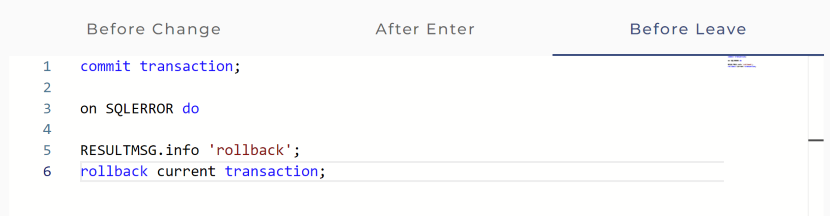 |
|---|
| error handler in the before leave trigger of the root table mapping |
This imitates the behavior if a graphical mapping with transaction handling is configured.
Testing the channel
You may test the Database target channel like every other outbound channel.
When the channel is configured the user can test its functionality by clicking on the test symbol in the tool bar of the Designer.
Then a dialog opens showing the events the channel receives or an error message.
See also
You also may use the channels Database BLOB Reader, Database Reader, Database Source Reader and Database Outbound Channel to access a database resources.