FTP Listener
Description
A FTP listener channel gives access to a file server using one of the protocols FTP, FTPS, or SFTP.
Purpose of object
A FTP listener is used to recognize new files and use them to trigger a process. If a new file, matching the search pattern, is found, a start event is generated, and a message with the content of the file is created.
Creation
To create an FTP Listener, follow the steps described in the general description of Channels.
Configuration
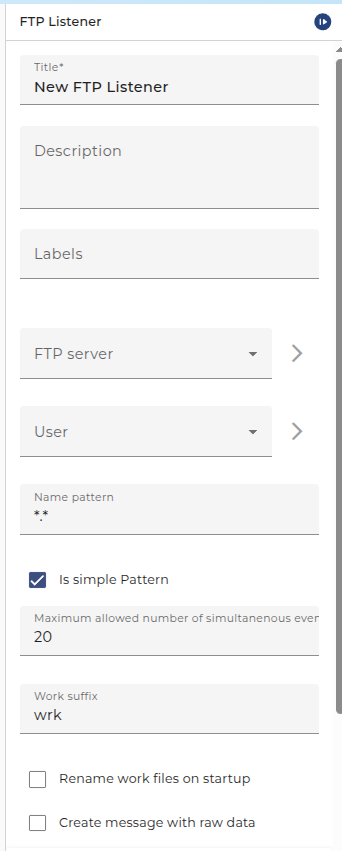
The dialog to configure the FTP Listener looks like:
Root configuration
- FTP Server: Choose an environment entry of type FTP server containing the connection information. For details, see FTP Connection.
- User: The Credential containing the login data on the FTP server. This user must have been created in the credentials before.
- Name pattern: Define a name pattern; only files whose names match the pattern are processed. There are two ways the name pattern can be interpreted depending on the state of the checkbox "Simple pattern". Refer to File Listener for more details.
- Is simple Pattern: Whether to use regex or a simple pattern. Refer to File Listener for more details.
- Polling period: See further information here.
- Max. simult. events: Define a maximum amount of elements processed in one polling interval.
- Work suffix: Choose a suffix that is added to the file while it is processed.
- Rename work files on startup: Whether to rename the work files during startup
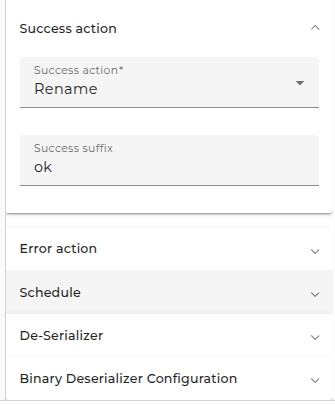
- Deserializer: Choose a deserializer to parse the file content and transform it into a message.
- Create message with raw data: whether to create a binary message
There are two parsing modes: parse on creation (the default) and parse on demand.
Success action
- Success action: Choose what to do if the processing succeeded. Available options are rename, move, delete, and move and rename.
- Success Suffix: Choose a suffix that is added to the file if it was successfully processed and the complete action is rename or move and rename.
- Archive Directory: In case of complete action move or move and rename here you enter the directory path where to move the file to. The directory is created automatically, if it doesn't exist yet. You can use pattern variables in the directory; see below.
Error action
- Error action: Choose what to do if the processing failed. Available options are rename, move, delete, and move and rename.
- Error Suffix: Choose a suffix that is added to the file if the processing failed and the error action is rename or move and rename.
- Archive directory: In case of error action move or move and rename here you enter the directory path where to move the file to. The directory is created automatically, if it doesn't exist yet. You can use pattern variables in the directory; see below.
- Minimum wait time before starting another process: If the channel encounters an error you can connect it in the process model with an error start event to create a process instance handling that error.
Schedule
Typically, the channel searches its source for available data periodically.
To change the intervals at which the channel searches its data, click on the button labeled with three dots, then edit the timer properties.
There are two types of timers: periodical timers and absolute timers. Both are configured using the same dialog. In most cases, a periodical timer is used, which regularly creates a signal.
Deserializer
Configure the deserializer for creating the messages output by the start element.