Beckhoff ADS Listener
Description
Beckhoff ADS Listener is used for listening to Beckhoff TwinCAT value changes using ADS protocol.
For using Beckhoff ADS channels you need to put the AdsToJava-3.dll in a folder and start the Orchestra applications with this argument -Djava.library.path=<Path to the DLL folder> .
Creation
To create an Beckhoff ADS Listener, follow the steps described in the general description of Channels.
Configuration
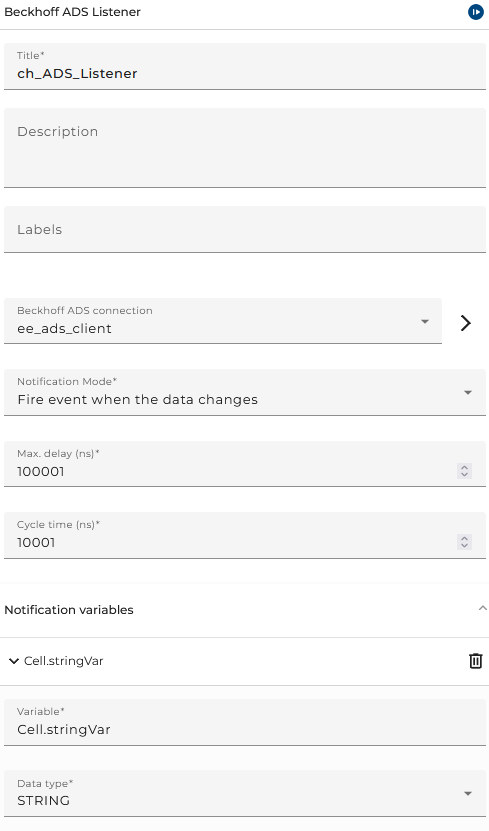
The dialog to configure the Beckhoff ADS Listener looks like:
 |
|---|
| Base view of the Beckhoff ADS Listener |
-
Beckhoff ADS Connection is the connection to Beckhoff TwinCAT
-
Notification Mode is the triggering condition of the notification
| Notification Mode | Description |
|---|---|
| Fire event when the data changes | Notifies only when the variable value changes. |
| Fire event cyclically | Notifies cyclically based on the PLC’s internal task cycle. |
| Gets cyclically updates and fire event when data changes | Gets cyclic updates but only notifies if the value has changed compared to the last value. |
| Client triggered cyclic notification event | Notifies cyclically at the interval specified by the client. |
-
Max. delay (ns) is maximal delay in nanoseconds
-
Cycle time (ns) is the cycle time of the notification in nanoseconds
Notification variables
-
Variable is the name of the variable to notify
<class name>.<variable name> -
Data type is the data type of the variable
Notification Message
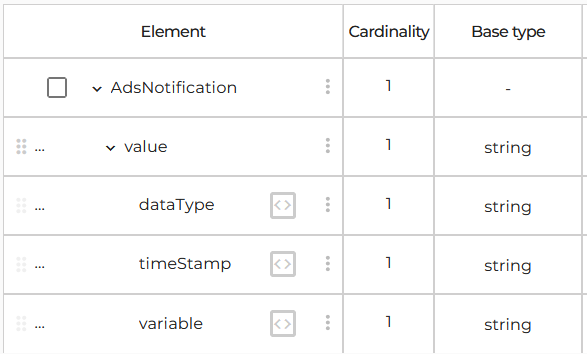
The ADS notification message type:
 |
|---|
| Message type of Beckhoff ADS Lister notification |
- value: the value
- timeStamp: The timestamp when the message was created
- variable: the variable name
- dataType: data type of the variable. As data type name, all type names found in the TwinCAT can be used here.
Example
<?xml version="1.0" encoding="UTF-8"?>
<AdsNotification>
	<value dataType="STRING" timeStamp="Fri Apr 11 10:34:18 CEST 2025" variable="MAIN.stringVar">Hello World</value>
</AdsNotification>