Settings
General Server Settings
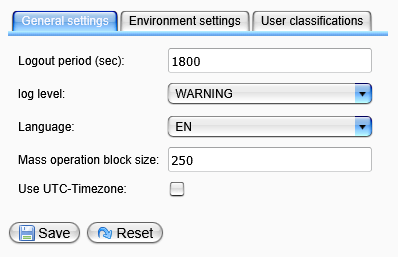
To view and modify general server settings, select Settings from the Settings category in the menu. Then, click on the General Settings tab if it is not currently active.
-
Logout Period:
This setting defines the period (in seconds) after which inactive users will be logged out of the monitor automatically. -
Log Level:
This option defines the log level to be used for the Orchestra server. -
Language:
This setting specifies the system language for the Orchestra server. It affects the language of the login dialog and system messages within the Orchestra log files. -
Mass Operation Block Size:
This parameter defines the block size for deleting processes from the process overview. When using the context menu in the process overview to delete multiple processes, this setting will determine the transaction size for the database. -
Use UTC Timezone:
This option specifies whether the Orchestra Monitor displays scenario timestamps in UTC timezone. By default (when switched off), timestamps are shown in the timezone corresponding to the server.
Finally, click the Save button to store your changes or the Reset button to revert all values to their default settings.