Patching
The Patching module allows a user to update an Orchestra installation by applying a specific patch file. Typically, the patch file is provided by the Orchestra support team and includes jar file replacements for the current installation.
Once a patch is confirmed, a notification at the top-right corner will display a message indicating that "Orchestra update is pending". The actual update is scheduled for the next restart of the Orchestra instance.
If Orchestra is deployed on Tomcat, please ensure that the classpath and javaagent options are set properly.
For more details, refer to:
The Patching view can be accessed in the Orchestra Monitor (web interface) on the left-hand side as a sub-item under the Administration category:
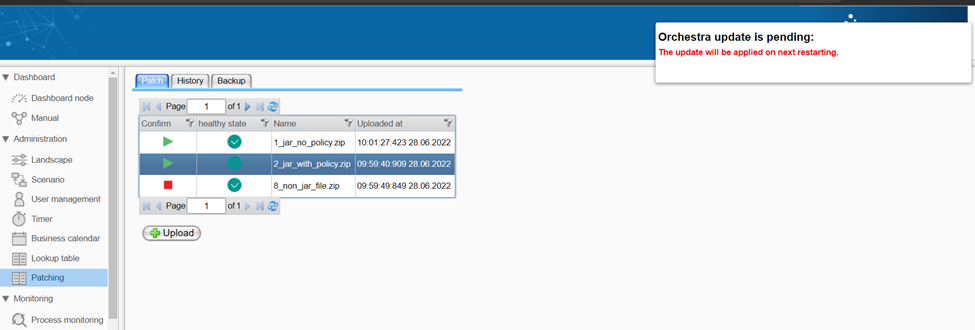
The patch table includes the following information:
- Confirm: Confirmation state, which can be either "confirmed" or "ignored". All patches in the "confirmed" state will be applied during the next restart of Orchestra.
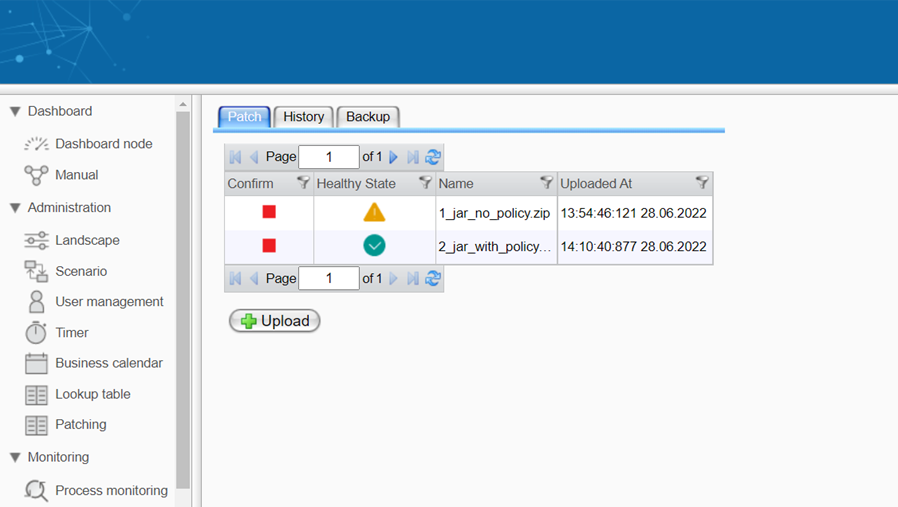
- Healthy State: In standalone mode, this should always be "ok". In cluster mode, it can be either "ok" or "warning". The warning state indicates differences between nodes regarding applied patches. An example of such a patch state is shown below.
- Name: Patch name
- Uploaded At: Uploaded date and time
The actions available from the "Patch" tab are described in the following chapters:
The "History" tab is described in the chapter "Patch History".
The "Backup" tab is described in the chapter "Patch Backup".
To manage and apply patches in the Monitor, the user must have the role "Patching.Admin".