Basics & Terminology
Standalone & Cluster
An Orchestra installation can operate in two modes: standalone or cluster
If Orchestra is working in standalone mode, exactly one Orchestra runtime is responsible for execution of the modeled scenarios.
When working as a cluster, Orchestra is working in a high availability setup. In this setup Orchestra has different physical runtimes that serve together a set of deployed scenarios. The nodes in this group use the same physical database. Furthermore, they observe each other in order to detect dead group members. If a dead member is detected the current work is shipped to the remaining nodes that fulfill the open requests.
Furthermore, it is possible to use the cell system in both operation modes. The cell system is a network of independent Orchestra systems that can be used to invoke service calls and send signals over different Orchestra instances. The cell system is location transparent.
Terminology
Node: One physical Orchestra installation of an Orchestra runtime.
Standalone: One Orchestra node that is completely responsible for serving scenarios.
Cluster: A group of nodes that collectively serve the same set of scenarios. All nodes in the group utilize the same runtime database.
Cell: A designation for a standalone or cluster installation that uniquely identifies this environment.
Cell Network: Any number of Orchestra cells that collaborate together.
Orchestra Instance: A term that identifies a standalone or cluster installation uniquely, similar to a cell.
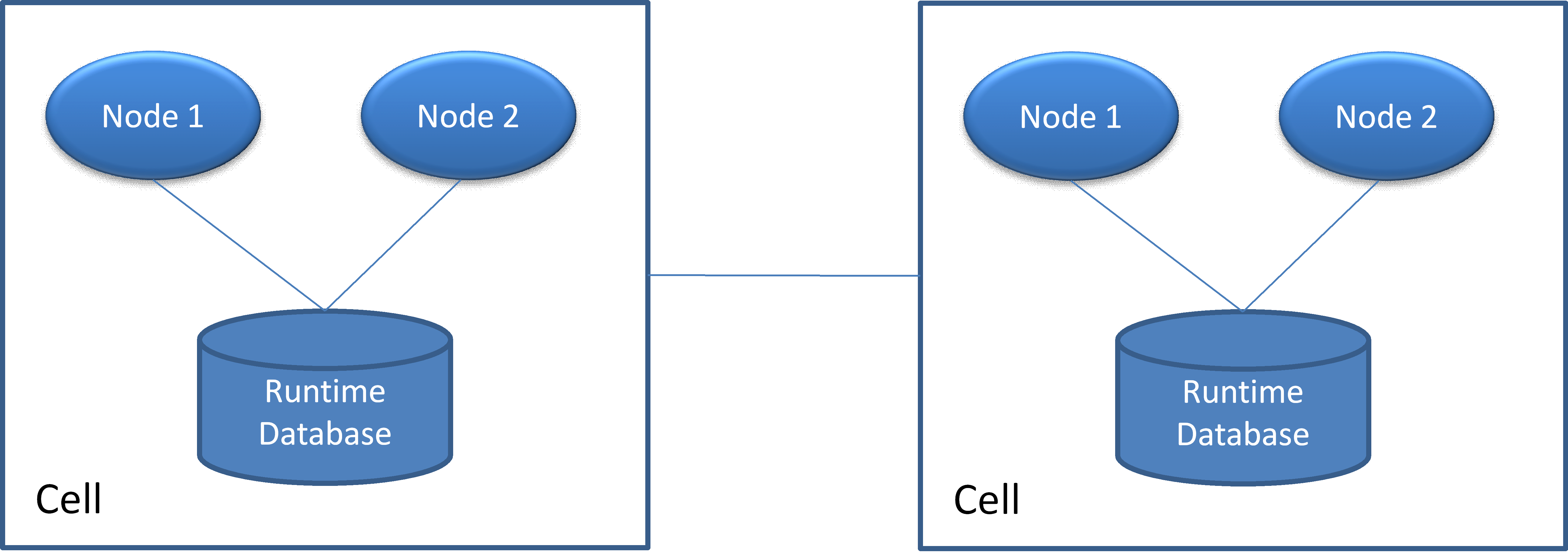
Cell Communication
Cell communication is a fundamental mechanism utilized for distributed communication between Orchestra instances. This allows scenarios to access services and send signals to various Orchestra instances seamlessly. The cell communication concept is designed to be location-transparent, meaning developers do not need to concern themselves with the physical distribution of components.
When a service is invoked or a signal is sent, Orchestra automatically identifies all responsible nodes within the cell network and directs the call or signal to the appropriate instance. It is not relevant for the developer to know whether the services interacting with one another are running on the same instance or are distributed across the cell network.
Usage scenarios for cell communication include:
-
Connecting an internal Orchestra with the Internet over a demilitarized zone
-
Managing different Orchestra instances across multiple company locations
-
Implementing manual load distribution
The distribution mechanism is available for the following scenario elements:
-
Partner Management (partner-send, partner-publish)
-
Signals
-
Orchestra services
Overview Cell Communication
When two Orchestra instances need to participate in a cell network, the involved cell nodes must be configured correctly.
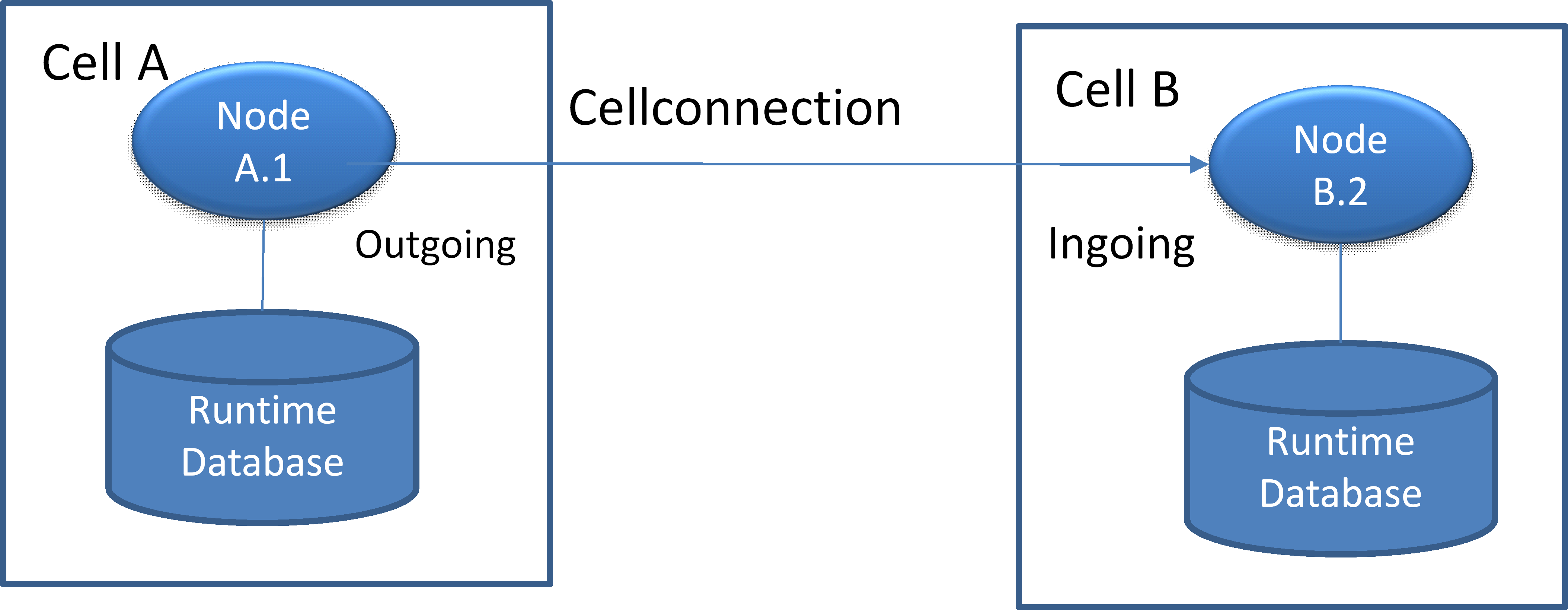
A cell connection represents a directed edge between two Orchestra nodes. The direction signifies the roles of the Orchestra nodes that need to communicate. The following roles are defined:
-
Outgoing: The node assigned the outgoing role is responsible for establishing a connection to the other node.In the example above, Node A.1 is responsible for the connection to Node B.2.
-
Ingoing: The node assigned the ingoing role must accept incoming connections. In the example above, Node B.2 is responsible for accepting connections from Node A.1. During the connection setup process, Node B.2 verifies the password and the source host to ensure that only trusted connections are permitted.
Orchestra Cluster Mode
You need an Orchestra Cluster license to operate Orchestra in cluster mode.
To ensure high availability and reliability, Orchestra can be operated in cluster mode. In this mode, several instances (nodes) collaborate to execute processes. All nodes within the cluster utilize the same physical database and monitor each other to detect and respond to node failures. When a node failure is detected, the current process instances are transferred to the remaining nodes for continued processing.
Orchestra Cluster Use Cases
-
High availability: Maintaining service availability even if a node fails
-
Balance: Optimal use of all available resources
-
Load distribution: Distributing incoming requests across multiple Orchestra nodes
-
Scalability: Adding additional nodes to the cluster network as the load increases
Overview Cluster Architecture
The following image illustrates the cluster architecture:
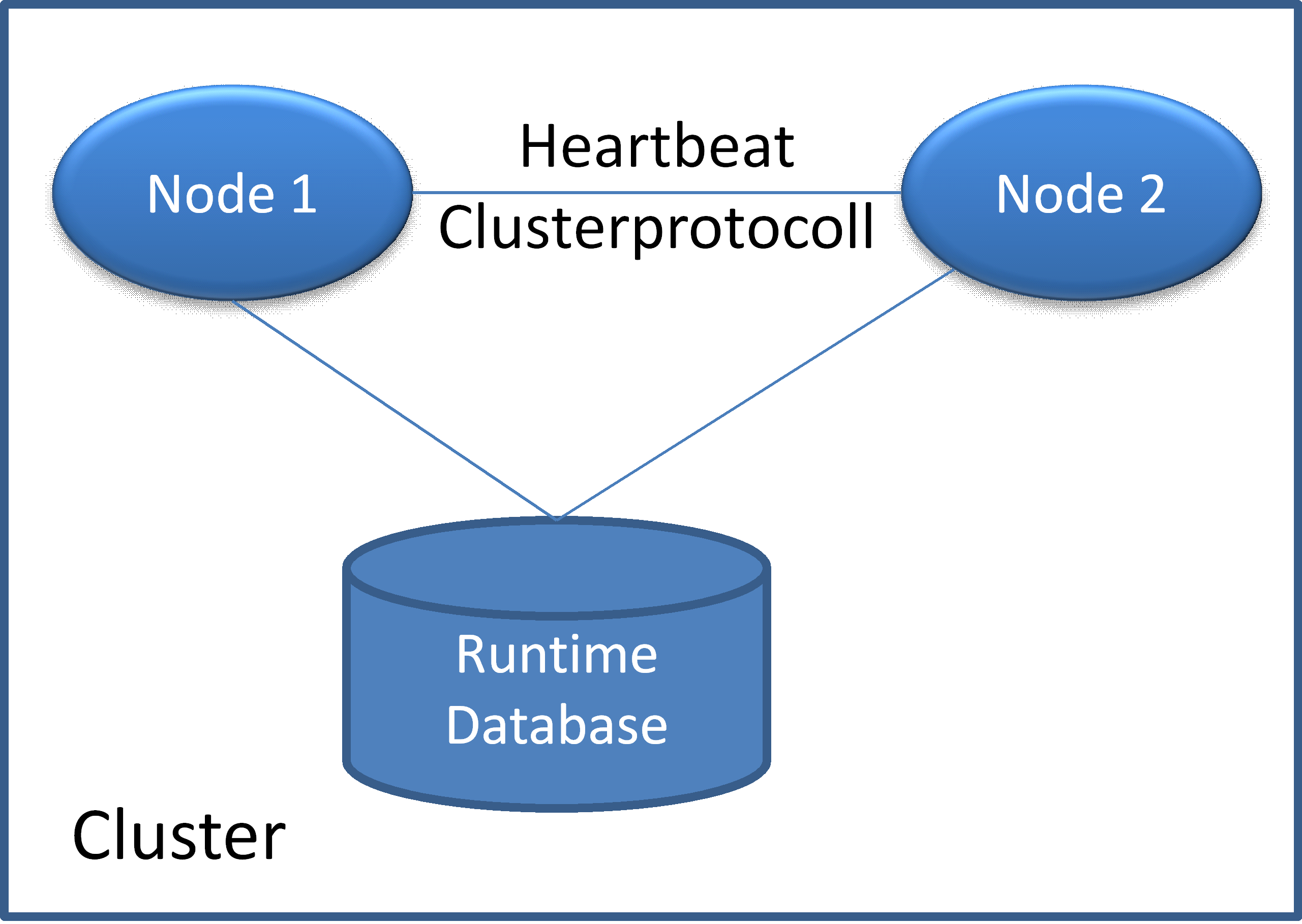
When Orchestra nodes are configured to operate as a cluster, additional operations, necessary only in cluster mode, must be performed. These operations include:
-
Maintaining integrity during operations that affect all cluster nodes, such as deployment and redeployment.
-
Heartbeat: Regularly checking the availability and functionality of nodes.
If the cluster detects that a node is unresponsive or has failed, a cluster switch is executed, automatically transferring all running persistent processes to the available node.
Orchestra supports an active/active cluster configuration, allowing both nodes to operate concurrently and handle the same scenarios.
Active/Passive Cluster
This configuration aims to enhance availability. Two Orchestra nodes are installed on separate hardware (virtualization is permitted), creating a failover cluster for improved reliability.
To implement an active/passive cluster, the Orchestra cluster system is not required. You can achieve this by configuring two Orchestra instances that share the same database, ensuring that only one node is active at any time. If the active node fails, you can stop it and start the secondary node, using standard clustering software available in Linux or Windows.
Note that load balancing is not possible in this configuration.
Functionality
In this mode, one Orchestra node actively processes incoming tasks while the other remains idle. Should the active node fail, a cluster switch occurs, enabling the idle node to immediately assume the workload and continue processing tasks.
Be aware that if an external dispatcher provides load to both nodes, the active/passive mode is rendered ineffective, resulting in both nodes operating concurrently. Thus, data must be directed to only one node.
Active/Active Cluster
This configuration also involves installing two Orchestra nodes on separate hardware (virtualization is permitted) to enhance reliability and achieve load balancing.
Functionality
Both Orchestra nodes remain active to process incoming tasks. This mode supports failover and load balancing. Orchestra continuously checks for the operational status of both nodes using database-level monitoring and network-layer verification through pinging and sending heartbeats.
The failover function operates similarly to the active/passive mode: should one node fail, a cluster switch transfers the load to the other node, allowing it to process tasks from both nodes.
In Orchestra, load balancing is implemented using a simple round-robin method, distributing incoming data alternately across the nodes. Non-TCP/IP-based incoming trigger events (e.g., web service calls or HTTP calls) can be managed internally by Orchestra. However, for TCP/IP-based input events, an external dispatcher is necessary.
Be mindful that parallel processing in cluster mode that involves simultaneous updates to a table can lead to deadlocks. Ensure that the underlying hardware for each node is adequately sized to handle the load of both nodes.
Summary
-
Orchestra supports the following cluster modes: Active/Active and Active/Passive.
-
Load balancing can be configured.
-
Failover can be configured.
-
Nodes monitor themselves and each other.
-
Orchestra supports a cluster configuration with up to four nodes.
-
If scenarios are deployed exclusively on one node, Orchestra will publish them automatically.
-
Each node should be sized to manage the overall system load.
-
Active dispatching of incoming HTTP events is not supported.
-
Interfaces governed by a timer (polling the database/file system) do not require a separate dispatcher.
-
Additionally, MQ or direct SAP connections do not necessitate a dispatcher if they support round-robin scheduling.