Worklist Server
If you are unfamiliar with the work list handler, please refer to the introduction in the Work List Handler section of the Architecture Manual for more information.
Enabling the Work List Handler for Runtime
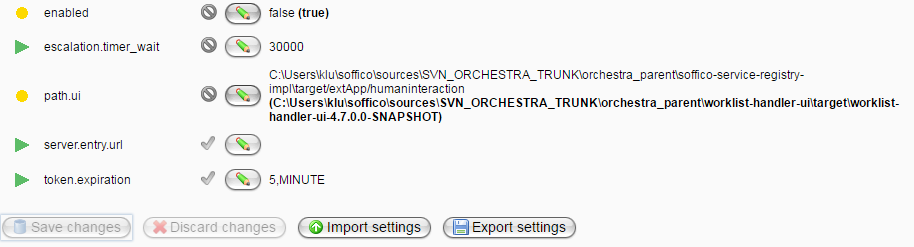
By default, the work list handler is disabled during runtime. Follow these steps to enable it:
-
Navigate to Settings -> Environment settings.
-
Select the group Worklist integration.
-
Set the parameter enabled to true.
-
Set the parameter path.ui to the sources of the work list handler (note that this refers to the application folder, which shares the name with the worklist-handler-ui WAR file—do not select the WAR file itself).
-
Save the changes.
-
Restart Orchestra.
-
The work list handler is now available. The standard URL is http://localhost:8090/humaninteraction/ui/. You can configure the URL under Settings -> Environment Settings in the group Embedded web application. Here, you can set the host name and the ports required.

Monitor Configurations
For managing the work list handler, several pages are available in the Orchestra monitor:

Details about the pages can be found here:
See Also
- Work List Handler in Designer Manual
- Human Interaction in Designer Manual