MCP Server
Configuration
:::warning Requirements
Node version 20.19 or higher is required to integrate the MCP server.
Npx version 11.6 or higher is required to use the mcp-remote wrapper.
:::
We have integrated an MCP server that allows access to selected functions of the Orchestra Monitor. In addition, we have integrated another MCP server that enables the use of exposed scenarios through AI.
These tools can then be accessed in the MCP client through the following setting:
{
  "servers": {
    "orchestra_monitor": {
      "transport": "streamable-http",
      "url": "<http/https>://<host>:<port>/monitor/mcp"       //monitor endpoint
    },
    "orchestra_scenarios": {
      "transport": "streamable-http",
      "url": "<http/https>://<host>:<port>/scenarios/mcp"     //scenario endpoint
    }
  }
}
In cases where the MCP client does not support streamable HTTP or OAuth authentication, you can use the following wrapper.
{
  "servers": {
    "orchestra_monitor-remote": {
      "command": "npx",
      "args": [
        "-y",
        "mcp-remote",
        "<http/https>://<host>:<port>/monitor/mcp",
        "--allow-http"                              //only for http
      ],
      "env": {
        "NODE_TLS_REJECT_UNAUTHORIZED": "0"         //only for https
      }
    }
  }
}
When authentication is enabled, you can run the mcp-remote command once separately. The token will then be cached
locally, allowing the client to authenticate automatically afterwards.
npx -y mcp-remote http://localhost:8019/monitor/mcp --allow-http
For https:
NODE_TLS_REJECT_UNAUTHORIZED=0 npx -y mcp-remote https://localhost:8443/monitor/mcp
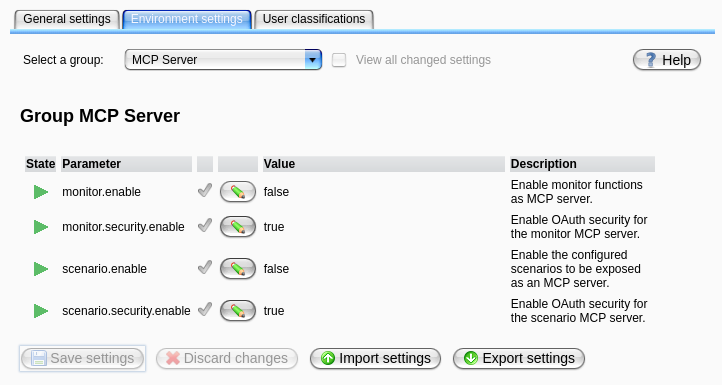
To enable the MCP server, see the MCP environment settings for configuration details.
Authentication
To enable authentication with the MCP server, the following settings must be configured:
- The MCP environment setting
monitor.security.enablemust be set to true. - The OAuth settings must be adjusted:
oauth.authorization.servermust be set.oauth.certificateEndpointmust be set.
The OAuth provider must support dynamic client registration and have it enabled in order for the OAuth flow to work properly.
Primitives
In the context of MCP (Model Context Protocol), primitives are the fundamental building blocks or low-level operations that define basic capabilities and data types used by MCP servers and clients to communicate and perform higher-level tasks.
The following primitives are available.
Resources
Resources are data objects or services that can be accessed and used by other components or systems.
| Name | Description | Needs authentication |
|---|---|---|
| Runtime Version | The current runtime version of orchestra | no |
Tools
Tools are executable actions or operations that can be invoked by a client through the MCP protocol to perform specific tasks or trigger functionality on the server.
| Name | Description | Needs authentication |
|---|---|---|
| runtime_list_scenarios | Get all scenarios on the runtime. | no |
| runtime_scenario_info | Get information about a scenario on the runtime. | no |
| runtime_start_scenario | Start a deployed scenario on the runtime. | yes |
| runtime_stop_scenario | Stop a deployed scenario on the runtime. | yes |
| runtime_logging_info | Get the last logging information of logging groups. | yes |
| runtime_get_system_events | Returns all System events of the orchestra runtime. | no |
| runtime_vulnerability_check | Check if there are any possible vulnerabilities on the runtime. | no |
| runtime_scenario_process_monitor_info_list | Get all process information about all scenarios on the runtime. | yes |
| runtime_scenario_process_monitor_info | Get process information about a scenario on the runtime. | yes |
| runtime_process_model_token_info | Get process information about a process model process on the runtime. | yes |
Only the primitives that can be used without authentication are exposed when authentication is disabled.