Cloud & Cell Environment
Concept
To enable optimal usage of Orchestra in a cloud-based environment, the software provides essential functionality. The primary purpose is to use Orchestra to connect multiple local networks to a global cloud environment. To achieve this, Soffico offers a lightweight component called Juno, which runs on local systems and communicates with a central Orchestra installation.
Sample Use Case
The mechanism can be utilized in various situations. It is not limited to operation within a cloud environment. To illustrate the purpose of Juno with Orchestra, consider the following use case:
-
Precondition:
An Orchestra installation (or multiple installations in the case of a cluster or cell system) is operational within a network. The network may be a cloud environment or your local company's infrastructure. -
Problem:
Your company operates several branches in different locations that need to share information with one another. These locations do not have a VPN connection or similar setup. Orchestra should be employed to facilitate this communication, with specific channels connecting the local networks of these locations to the Orchestra system. -
Solution:
Orchestra offers a local application that can be easily integrated with an Orchestra installation in a different network. This component can be quickly installed and managed from the Orchestra monitor. This application is referred to as Juno. Juno is not a comprehensive Orchestra installation; it houses only the channel-specific engines. Consequently, only channels can be installed on this component. You can transfer any channel to a Juno installation, regardless of the scenario or Orchestra node. -
Conclusion:
The mechanism is highly flexible, allowing multiple Juno instances to connect to Orchestra, thus offering numerous possibilities. A potential system architecture might resemble the following: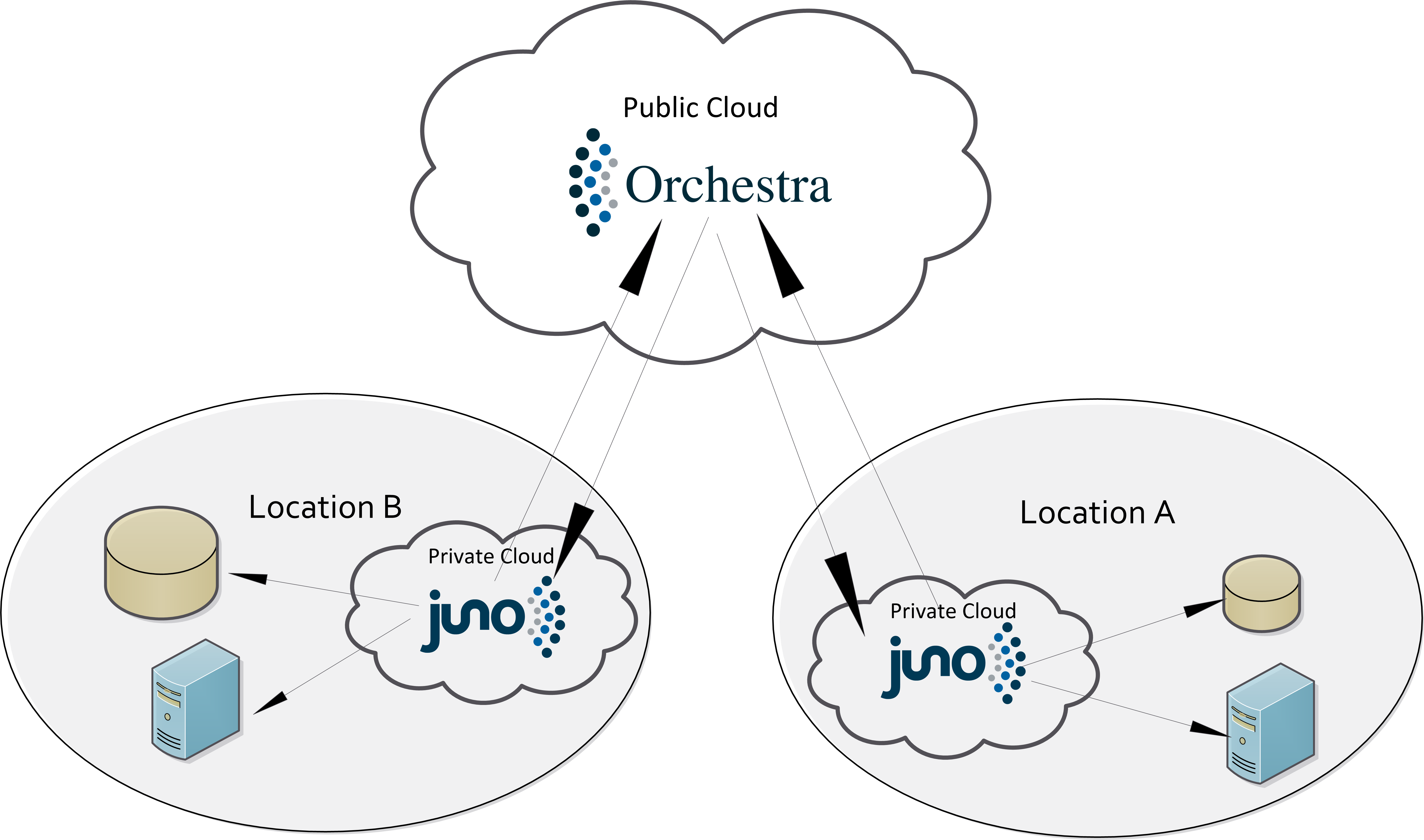
Creation
To clarify the creation process, the following steps are provided:
- Create a Juno instance on your Orchestra master node as described in the section "Overview".
- Download the Juno installation from the Orchestra master and transfer the file to its intended destination.
- Refer to the installation guide included in the zip file or in section "Juno". If the configuration is correct, the component will connect automatically to Orchestra.
- Channel switching can then be accomplished in the Administration view. After selecting a scenario, two boxes will be displayed: one for Orchestra and one for the Juno instance. Channels can now be easily transferred between the networks via drag-and-drop.
Security
Orchestra and Juno interact securely, employing various security mechanisms to achieve the following primary protection goals:
-
Confidentiality:
The configuration and administration of Juno data can only be conducted via the Orchestra Monitor. This ensures that only authorized personnel can alter processing functionality. -
Authenticity:
A Juno instance can only connect to Orchestra if it is registered in Orchestra's Juno registry and the correct password is provided. Each downloaded instance can connect only once. -
Integrity:
Juno maintains normal operational behavior in scenario administration and process execution without relying on external components. The data contained will remain unchanged during the transmission process. -
Availability:
Juno guarantees a robust connection and reliable data transfer. In case of connection issues, Juno will manage data processing accurately, handling connection loss and automatically reconnecting when the connection is restored. -
Data Transfer Security:
The connection between Orchestra and Juno utilizes a bidirectional secure TLS connection. Juno employs its own protocol for communication with Orchestra.
Usage
Managing Juno from the monitor occurs in the "Cloud Environment" section, which includes two views:
-
Overview:
In this view, you can disconnect and delete Juno instances or create new ones. You will also have an overview of the current status of all running instances. -
Administration:
This view addresses the channel switching mechanism. After deploying a scenario, channels can be redirected to a Juno instance. The distribution of various channels will be managed here.
Please refer to the subsequent sections for more detailed information about these views.