Edit User - Assign Access Rights
Apart from the General and Authentications tabs, the user details dialog contains three additional tabs: Groups, Roles, and Scenarios.
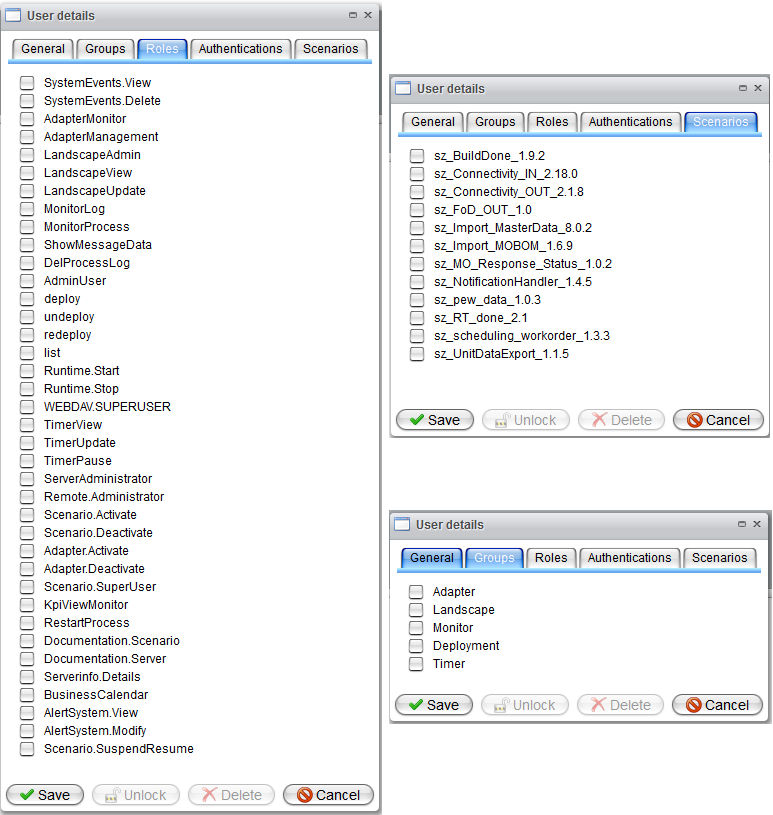
Orchestra distinguishes between groups, roles, and scenario permissions. The configuration of these permissions can be performed using the remaining tabs in the user details dialog.
A permission group is a collection of multiple roles. If a group is enabled, roles related to that group cannot be manually disabled via the Roles tab.
Be aware that the permission management is a powerful tool and should only be used by experienced Orchestra system administrators.
To ensure access to the monitor at all times, please refrain from altering the roles and groups of default Orchestra users (admin and monitor).
For detailed information about the permissions and their meanings, please refer to the table below:
| Group | Role | Description |
|---|---|---|
| SystemEvents | Permission to control access to system event management | |
| SystemEvents.View | Permission to view system events | |
| SystemEvents.Delete | Permission to delete system events | |
| Adapter | Permission to configure the channel settings for the user-assigned scenarios | |
| AdapterMonitor | Permission to view the channel administration (only user-assigned scenarios will be considered) | |
| AdapterManagement | Permission to use the reset function on the adapter details view | |
| Adapter.Activate | Permission to activate an adapter (channel) | |
| Adapter.Deactivate | Permission to deactivate an adapter (channel) | |
| Landscape | Permission to configure the landscape settings for the user-assigned scenarios | |
| LandscapeAdmin | Permission to use the backup and recovery functionality | |
| LandscapeView | Permission to view the landscape administration (only user-assigned scenarios will be considered) | |
| LandscapeUpdate | Permission to adapt the landscape entry configuration | |
| Monitor | Permission to analyze log files and permits access to process monitoring | |
| MonitorLog | Permission to access logging groups and log files | |
| MonitorProcess | Permission to access process monitoring (only user-assigned scenarios will be considered) | |
| ShowMessageData | Permission to access the content of messages inside the processes | |
| Admin | Permission to control processes and manage scenario users | |
| DelProcessLog | Permission to abort and delete processes (including process logs) | |
| Users | Permission to manage scenario users | |
| AdminUser | Permission for administration of monitor and scenario users | |
| AdminScenarioUsers | Permission to maintain scenario users | |
| Deployment | Permission to access the scenario administration | |
| Deploy | Permission to deploy a scenario | |
| Undeploy | Permission to undeploy a scenario | |
| Redeploy | Permission to redeploy a scenario | |
| List | Permission to view scenario administration (only user-assigned scenarios will be considered) | |
| Scenario.Download | Permission to download PSC files for deployed scenarios | |
| Scenario.Activate | Permission to activate a scenario | |
| Scenario.Deactivate | Permission to deactivate a scenario | |
| Runtime and Scenario | Permission for scenario and runtime control | |
| Scenario.SuspendResume | Permission to control the scenario triggers and persistent queuing | |
| Scenario.SuperUser | Permission to view all scenarios (the scenario assignments tab will be ignored) | |
| Runtime.Start | Permission to start the runtime | |
| Runtime.Stop | Permission to stop the runtime | |
| WEBDAV.SUPERUSER | Grants administrative access to web-DAV channels | |
| Timer | Permission to configure the timer settings for user-assigned scenarios | |
| TimerView | Permission to view the timer administration (only user-assigned scenarios will be considered) | |
| TimerUpdate | Permission to modify the timer configuration | |
| TimerPause | Permission to start and stop a timer | |
| Throttling | Permission to configure the throttling settings for users | |
| Throttling.View | Permission to access the Throttling page in read mode | |
| Throttling.Modify | Permission to modify the throttling configuration | |
| Lookup Table | Permission to configure the lookup table settings | |
| LookupTableView | Permission to access the lookup table page in read mode | |
| LookupTableUpdate | Permission to modify the lookup table configuration | |
| Licensing | Permissions to access and control licensing | |
| Licensing.View | Permission to access the licensing page in read mode | |
| Licensing.Admin | Permission to process the licensing workflow | |
| Other | Permission to access web-related applications, control scenario documentation, and enable additional functionality | |
| ServerAdministrator | Permission to save settings in general settings like logout period or log level | |
| RemoteAdministrator | Access to the internal web services | |
| KpiViewMonitor | Permission to access the signal monitoring dashboard | |
| RestartProcess | Permission to use the process restart functionality | |
| Documentation.Scenario | Permission to view scenario documentation (only user-assigned scenarios will be considered) | |
| Documentation.Server | Permission to download scenario documentation for all deployed scenarios | |
| Serverinfo.Details | Permission to view and download server information | |
| BusinessCalendar | Permission to use the business calendar functionality | |
| AlertSystem.View | Permission to view the administrative interface of alerting | |
| AlertSystem.Modify | Permission to maintain the alerting rules and actions (includes download and recovery) | |
| Show.hidden.variables | Permission to view all process variables regardless of protection (if "hide.process.variables" is true) | |
| Cell.Admin | Access to the CellCommunicationServiceMonitor | |
| LandscapeAdmin | Permission to edit/execute landscape entries | |
| LandscapeUpdate | Permission to update/change landscape information | |
| QueryModuleInfo | Permission to see module overview in the Module Info tab of Server info, providing insights into module status | |
| Recompute.LTA.Statistics | Permission to recompute statistics of LTA | |
| Recompute.Process.Overview | Permission to recompute process overview | |
| EnvironmentSettings.Reader | Permission to read environment settings in the monitor | |
| EnvironmentSettings.Writer | Permission to modify environment settings from the monitor | |
| HealthCheckAdmin | Permission to edit the HealthCheck | |
| HealthCheckUser | Permission to execute the HealthCheck | |
| Remote.External.Monitor.Endpoint | Permission to access the external monitoring endpoint | |
| Remote.Impersonation | Trust in users authenticated by a remote Orchestra | |
| Remote.Qbilon.Export | Permission to access the Qbilon endpoint | |
| Remote.Administrator | Permission to access the Orchestra remote web services via HTTP/HTTPS | |
| Patching.Admin | Permission to manage Orchestra patching, including scheduling and execution | |
| Change.process.user.state | Permission to manage user-defined process state in the monitoring view | |
| Security.ExportRuntime | Permission to export runtime configurations | |
| Security.ImportRuntime | Permission to import runtime configurations | |
| ServerMaintenance | Permission to evaluate SQL statements via RemoteService DatabaseMonitorService |