Orchestra Solution Hub
Product description — Solution Hub 5.1.0.0.
Description
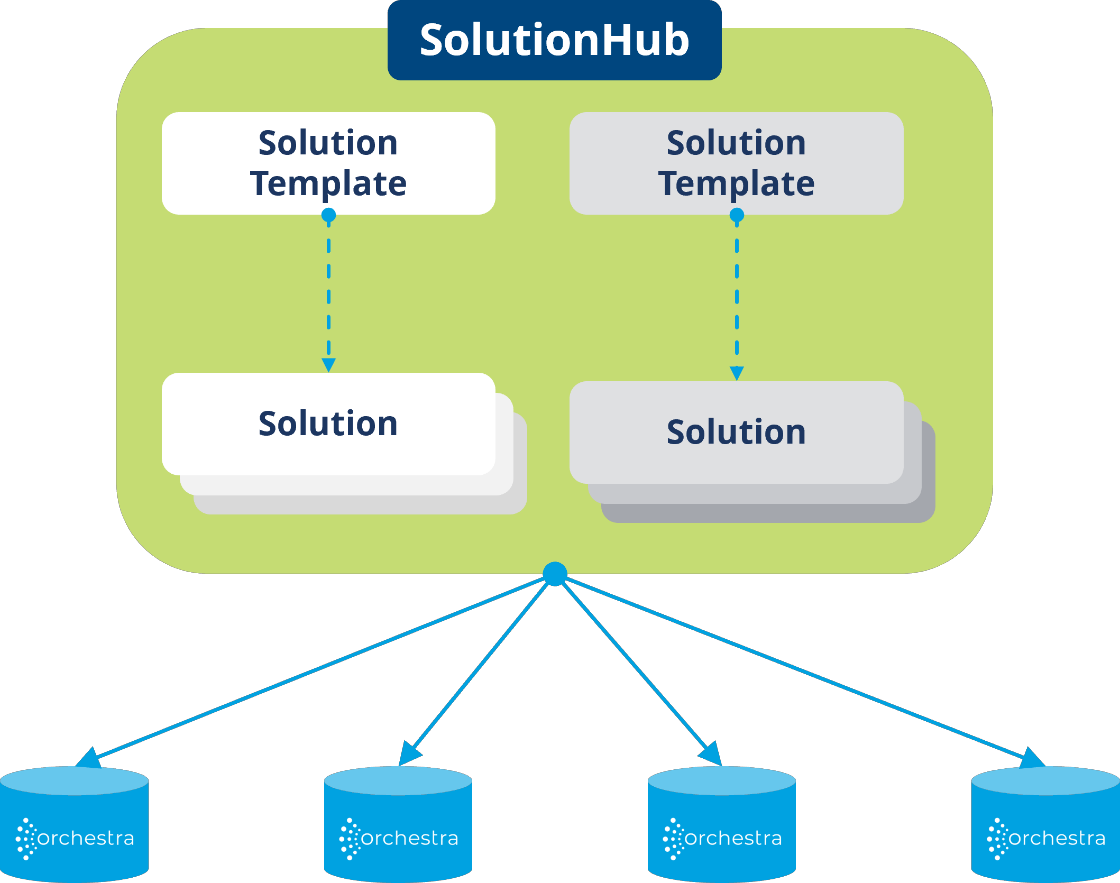
The Solution Hub is a powerful and user-friendly tool that allows users to organize Orchestra scenarios, use them as solution templates, and run solutions derived from the templates on distributed Orchestra runtime architectures. In addition, an update mechanism for the solutions will be provided.
Solutions can be configured directly in the Solution Hub and rolled out to the desired Orchestra instances – no knowledge of the Orchestra Designer is required.
In the future, the Solution Hub will become the central platform for highly distributed Orchestra environments.
Key features and functions
Templates, Solutions & Bundles
- Solution Templates: The Solution Hub allows users to import Orchestra scenarios as solution templates and reuse them in (highly) distributed architectures.
- Solutions: Users can adapt the solution templates as solutions. These can be adapted to a corresponding runtime and connected systems. Configuration is done centrally in the Solution Hub. Editing in the Orchestra Designer is not necessary. In addition, any number of solutions can be quickly and easily derived from a solution template.
- Solution Templates Versions: Multiple versions of one template can be provided in the Solution Hub. This makes it possible to quickly and easily swap the underlying template version in the derived solutions.
- Bundles: In the Orchestra Web-Designer, multiple scenarios can be grouped into a single bundle to map, for example, a specific use case or connector. These bundles can also be imported into the Solution Hub as templates, configured as a solution, and rolled out to runtime instances. The scenarios within a bundle can be configured via a central configuration file.
Remote Management
- Deployment: The Solution Hub allows users to deploy one or more solutions centrally to different Orchestra Runtime instances. This includes both deployment and undeployment.
- Status management: In addition, the Solution Hub allows the activation and deactivation of solutions (adapted scenarios) in a central application. Direct access to the runtime (monitor) thus becomes obsolete.
- Synchronization: The solutions managed in the Solution Hub can be synchronized with the versions deployed on the Orchestra instance. If there is a corresponding version deviation, an info is output. Furthermore, the version of the solution in the Solution Hub can be overwritten with the version of the solution deployed on the server.
- Push and pull mode:
- Push: The solutions can be deployed directly from the Solution Hub to the connected Orchestra Runtime instances.
- Pull: The connected Orchestra Runtime instances fetch the solutions assigned to them from the Solution Hub - this is also possible on a date/time basis.
CI/CD Integration
- Integration: the Solution Hub can be integrated into your own CI/CD pipelines. This allows the deployment processes to be further automated and made efficient.
Solution Testing
- Testing: The Solution Hub has built-in support for the Orchestra test feature. Each solution created in the Solution Hub can be tested by running all the test cases included in the scenario.
Publish-Subscribe
- The Solution Hub enables the distribution of information between a sender scenario and any number of receiver scenarios.
Send-Receive
- The Solution Hub also enables the consolidation of information from different sender scenarios within a single receiver scenario.
MCP capability
Starting with version 5.1, the Solution Hub offers MCP tool support, allowing external systems and AI agents to interact directly with it without requiring manual interaction with the user interface.
Using the provided tools, you can, among other things, create solutions and deploy, redeploy, and undeploy them to runtime instances.
This opens up new possibilities for automation, orchestration, and intelligent assistance workflows based on the Solution Hub.
Use cases (examples)
- Easy and fast multiplication of scenarios
- Configuration of scenarios and solutions: without designers, e.g. environment variables, security settings, etc.
- Management and versioning of solutions
- Remote Management incl. update
- Deployment of solutions on multiple runtime instances
- Deployment of multiple solutions on a runtime instance
- Distribution and Aggregation of Information
Target group
- Orchestra developers who want to provide and manage templates
- Ops teams that need to run solutions on (highly) distributed systems
- Anyone who wants to offer ready-made solutions that only need to be configured
Advantages
- Scalable rollout of scenarios into (highly) distributed runtime instances, e.g. in industrial edge cloud architectures
- Templating incl. versioning of these for recurring use cases / interfaces
- Efficient remote management of runtime instances (e.g. for development partners)
- Implementation of interoperable, highly distributed data architectures
Requirements
- Orchestra version 4.16 or later.
- Orchestra version 5.1.1.0 or higher is required for pull mode.
- Orchestra version 5.3.0.0 or higher is required to use the bundles.
- To use MCP capabilities, the user must have a generative AI model that is implemented as an MCP client.
Notes on use
- Training and support for users are available to ensure that the feature is used effectively.
- Feedback and suggestions are always welcome to continuously improve the feature.
Licensing model
Two Orchestra Runtime instances can be used in the Solution Hub. If required, the unlimited connection to Orchestra Runtime instances can be re-licensed at any time. Please send inquiries to: customer@soffico.de